


- Posts: 2
- Thank you received: 0
SHOW BLACK BOX ON TOP
15 years 11 months ago - 15 years 11 months ago #313
by laspiur
SHOW BLACK BOX ON TOP was created by laspiur
HI. It seems to be a nice module to show moving images. I have a little problem, I need to show the images (7) without any title, link and text. It show a black box (semi-transparent) in the top part of the image box. What is my problem??
Sorry for my beggineer english. Bye
Sorry for my beggineer english. Bye

Last edit: 15 years 11 months ago by laspiur. Reason: remove image for privacy
Please Log in to join the conversation.

15 years 11 months ago #315
by milos
Replied by milos on topic Re:SHOW BLACK BOX ON TOP
Open file default.php and remove lines from 109 to 116.
Code:
<div id="slide-controls">
.
.
.
</div>
Please Log in to join the conversation.
15 years 11 months ago #317
by laspiur
Replied by laspiur on topic Re:SHOW BLACK BOX ON TOP
It works great!! Thanks!! :laugh: :laugh: :laugh: :laugh:
Please Log in to join the conversation.

14 years 10 months ago #5172
by akay_cube
Replied by akay_cube on topic Re:SHOW BLACK BOX ON TOP
Hi milos, I actually have the titles and descriptions and i would need the buttons, however, I don't want the semi transparent black strip, please can you help? Thanks
Please Log in to join the conversation.
-
ivan.milic
Support Staff -

- Offline
- Moderator
-

Less
More
- Posts: 14116
- Thank you received: 1639
14 years 9 months ago #5208
by ivan.milic
Replied by ivan.milic on topic Re:SHOW BLACK BOX ON TOP
In Templte Manager -> Edit HTML (index.php)
Image marked red is that image. You can eater put background-image:none; or just change that image.
div#header_hotslider div#slide-holder div#slide-controls {
left: 0;
top: 10px;
width: 528px;
height: 46px;
display: none;
position: absolute;
background: url(modules/mod_hot_image_slider/images/slide-bg.png) 0 0;
}
Image marked red is that image. You can eater put background-image:none; or just change that image.
div#header_hotslider div#slide-holder div#slide-controls {
left: 0;
top: 10px;
width: 528px;
height: 46px;
display: none;
position: absolute;
background: url(modules/mod_hot_image_slider/images/slide-bg.png) 0 0;
}
Please Log in to join the conversation.


14 years 7 months ago - 14 years 7 months ago #7212
by wkaatz
having a similar(?)issue, but these instructions don't seem to make sense...
i am using this mod with hot_furniture template.
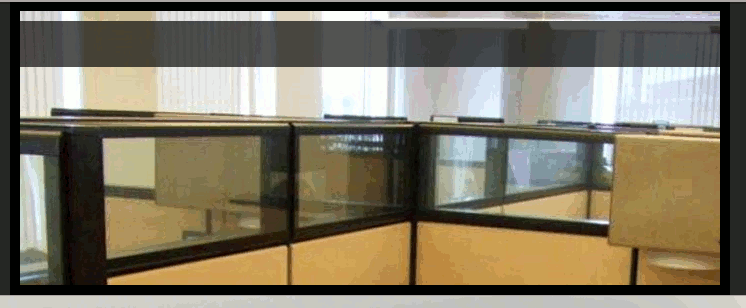
Replied by wkaatz on topic Re:SHOW BLACK BOX ON TOP
ivan.milic wrote: In Templte Manager -> Edit HTML (index.php)
Image marked red is that image. You can eater put background-image:none; or just change that image.
div#header_hotslider div#slide-holder div#slide-controls {
left: 0;
top: 10px;
width: 528px;
height: 46px;
display: none;
position: absolute;
background: url(modules/mod_hot_image_slider/images/slide-bg.png) 0 0;
}
having a similar(?)issue, but these instructions don't seem to make sense...
i am using this mod with hot_furniture template.
Last edit: 14 years 7 months ago by wkaatz. Reason: edit
Please Log in to join the conversation.
Time to create page: 0.360 seconds