

- Posts: 4
- Thank you received: 0
Gallery is blank !!
14 years 10 months ago #9921
by keizerbiz
Gallery is blank !! was created by keizerbiz
My client has requested Hot Joomla Gallery, so I have installed it on site running Joomla 1.5.21.
I have ENABLED jQuery, have loaded .jpgs, and entered proper file path.
BUT Gallery page is blank. Nothing but white background on large image area and thumbnails.
Do I need to load a separate jQuery plugin?
site is www.shadowhunterllc.com/bottom-menu/pictures.html .
Will buy a commercial HOt Joomla Extension if I can get some support. Please help.
I have ENABLED jQuery, have loaded .jpgs, and entered proper file path.
BUT Gallery page is blank. Nothing but white background on large image area and thumbnails.
Do I need to load a separate jQuery plugin?
site is www.shadowhunterllc.com/bottom-menu/pictures.html .
Will buy a commercial HOt Joomla Extension if I can get some support. Please help.
Please Log in to join the conversation.
-
ivan.milic
Support Staff - Offline
- Moderator
-

Less
More
- Posts: 14116
- Thank you received: 1639
14 years 10 months ago #9934
by ivan.milic
Replied by ivan.milic on topic Re: Gallery is blank !!
You have this in source:
<link href="/..??../jquery-ui-1.8.11.custom.css" rel="stylesheet" type="text/css" />
<script src="/..???../jquery-1.5.2.min.js" type="text/javascript"></script>
<script src="/r..???../jquery-ui-1.8.11.custom.min.js" type="text/javascript"></script>
you probably saw explanation how to optimize jquery for site .
..???.. <- can not be on real site. That's an example in explanation. It should be some real path like:
..src="/templates/some_template/js/jquery-1.5.2.min.js"..
and you also need to copy that file there to relay exist there. You can also use absolute paths.
<link href="/..??../jquery-ui-1.8.11.custom.css" rel="stylesheet" type="text/css" />
<script src="/..???../jquery-1.5.2.min.js" type="text/javascript"></script>
<script src="/r..???../jquery-ui-1.8.11.custom.min.js" type="text/javascript"></script>
you probably saw explanation how to optimize jquery for site .
..???.. <- can not be on real site. That's an example in explanation. It should be some real path like:
..src="/templates/some_template/js/jquery-1.5.2.min.js"..
and you also need to copy that file there to relay exist there. You can also use absolute paths.
Please Log in to join the conversation.
14 years 10 months ago #9969
by keizerbiz
Replied by keizerbiz on topic Re: Gallery is blank !!
PLEASE tell what script to load into the template index.php file.
And PLEASE TELL ME what .js file to upload to the /js directory.
www.shadowhunterllc.com/bottom-menu/pictures.html
And PLEASE TELL ME what .js file to upload to the /js directory.
www.shadowhunterllc.com/bottom-menu/pictures.html
Please Log in to join the conversation.
-
ivan.milic
Support Staff - Offline
- Moderator
-
Less
More
- Posts: 14116
- Thank you received: 1639
14 years 10 months ago #9976
by ivan.milic
Replied by ivan.milic on topic Re: Gallery is blank !!
Here is an link to jquery download:
jqueryui.com/download
copy two files from js folder you can find in zip to js folder in your template.
then copy ui-lightness folder to you template js folder also.
in head section of index.php of template first make css reference to jquery-ui-1.8.14.custom.css which is ui-lightness folder.
After that make script references to those two .js files.
This 3 references should be as much closer to begging og pages <head> tag.
jqueryui.com/download
copy two files from js folder you can find in zip to js folder in your template.
then copy ui-lightness folder to you template js folder also.
in head section of index.php of template first make css reference to jquery-ui-1.8.14.custom.css which is ui-lightness folder.
After that make script references to those two .js files.
This 3 references should be as much closer to begging og pages <head> tag.
Please Log in to join the conversation.
14 years 9 months ago #10071
by keizerbiz
Replied by keizerbiz on topic Re: Gallery is blank !!
Ok, am trying this again....
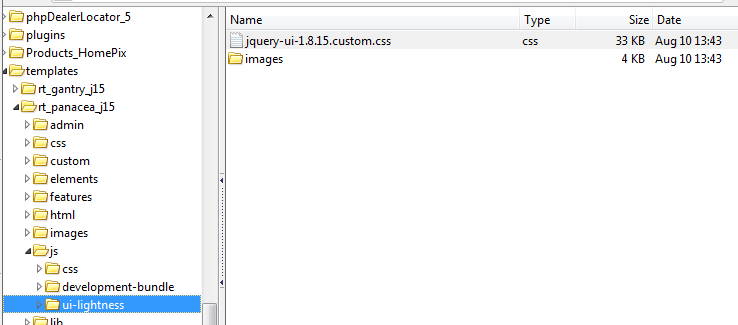
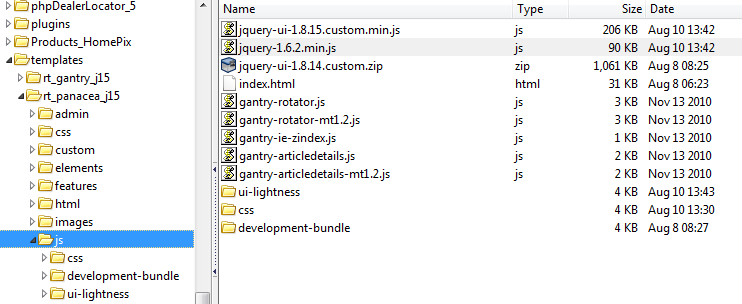
Here is where I am placing script and css references:
/home/shadowhu/public_html/templates/rt_panacea_j15/index.php
Here are references in relation to head tag
<LINK REL=StyleSheet HREF="/templates/rt_panacea_j15/js/ui-lightness/jquery-ui-1.8.15.custom.css" TYPE="text/css" MEDIA=screen>
<script src="/templates/rt_panacea_j15/js/jquery-ui-1.8.15.custom.min.js" type="text/javascript"></script>
<script src="/templates/rt_panacea_j15/js/jquery-1.6.2.min.js" type="text/javascript"></script>
</head>
</head>
___________
Should links be relative to public_html.... or relative to the template? THANK YOU !
www.shadowhunterllc.com/bottom-menu/pictures.html
Some images show; others do not. Thumbnails do not show. What is optimal file: .jpg?
Here is where I am placing script and css references:
/home/shadowhu/public_html/templates/rt_panacea_j15/index.php
Here are references in relation to head tag
<LINK REL=StyleSheet HREF="/templates/rt_panacea_j15/js/ui-lightness/jquery-ui-1.8.15.custom.css" TYPE="text/css" MEDIA=screen>
<script src="/templates/rt_panacea_j15/js/jquery-ui-1.8.15.custom.min.js" type="text/javascript"></script>
<script src="/templates/rt_panacea_j15/js/jquery-1.6.2.min.js" type="text/javascript"></script>
</head>
</head>
___________
Should links be relative to public_html.... or relative to the template? THANK YOU !
www.shadowhunterllc.com/bottom-menu/pictures.html
Some images show; others do not. Thumbnails do not show. What is optimal file: .jpg?
Please Log in to join the conversation.
-
ivan.milic
Support Staff - Offline
- Moderator
-
Less
More
- Posts: 14116
- Thank you received: 1639
14 years 9 months ago #10095
by ivan.milic
Replied by ivan.milic on topic Re: Gallery is blank !!
Hi,
references are late put them more up in head section.
When you go to view source in your browser you should have them before other <script ... references.
references are late put them more up in head section.
When you go to view source in your browser you should have them before other <script ... references.
Please Log in to join the conversation.
Time to create page: 0.200 seconds