

- Posts: 3
- Thank you received: 0
Legacy: 1.0, fwd&bk buttons on top/btm in horiztl
16 years 3 months ago - 16 years 3 months ago #591
by mermedia
Legacy: 1.0, fwd&bk buttons on top/btm in horiztl was created by mermedia
Hi, it may be because I am in Legacy mode, the forward and back buttons are showing on the top and bottom and not on the right and left even though it is set to Horizontal mode. Is there a work around?
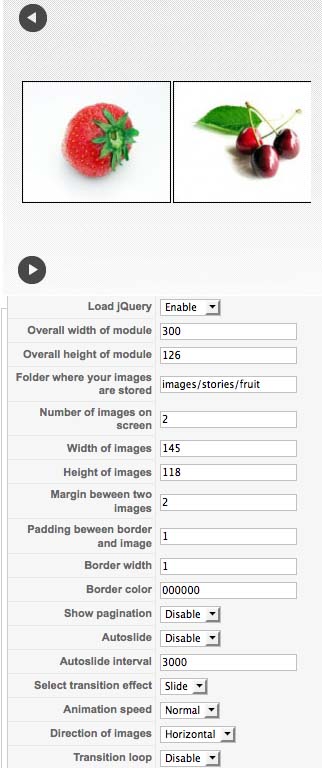
Last edit: 16 years 3 months ago by mermedia. Reason: image to add
Please Log in to join the conversation.


16 years 3 months ago #592
by milos
Replied by milos on topic Re: Legacy: 1.0, fwd&bk buttons on top/btm in horiztl
No, it's because image width is too big. Please reduce it. Or reduce number of images shown on screen.
Please Log in to join the conversation.
16 years 3 months ago #593
by mermedia
Replied by mermedia on topic Re: Legacy: 1.0, fwd&bk buttons on top/btm in horiztl
reduced it to 80, still not working. What is strange though is that I set it to two images, and it still shows 4.
www.mermedia.com/portals.html
www.mermedia.com/portals.html
Please Log in to join the conversation.
16 years 3 months ago #594
by milos
Replied by milos on topic Re: Legacy: 1.0, fwd&bk buttons on top/btm in horiztl
Try to add "width:100%;" for "table.moduletable td" in your template css file.
Please Log in to join the conversation.
16 years 3 months ago #597
by mermedia
Replied by mermedia on topic Re: Legacy: 1.0, fwd&bk buttons on top/btm in horiztl
Like this?
/* MAMBO MODULES FORMATTING */
table.moduletable {
width : 160px;
table-layout : auto;
/* Formatting the module table */
}
table.moduletable th {
text-align: center;
/*font-size : 11px;*/
background-image: url(../images/menutopbck.gif);
font-weight : bold;
width : 100%;
height: 32px;
color: #666666;
text-decoration :none;
text-transform : uppercase;
padding-top:10px;
}
/* Formatting the module header, and the module titles */
table.moduletable td {
width : 100%;
padding-left: 0px;} /* Formatting the table cells of the module table */
Doesn't seem to fix.
/* MAMBO MODULES FORMATTING */
table.moduletable {
width : 160px;
table-layout : auto;
/* Formatting the module table */
}
table.moduletable th {
text-align: center;
/*font-size : 11px;*/
background-image: url(../images/menutopbck.gif);
font-weight : bold;
width : 100%;
height: 32px;
color: #666666;
text-decoration :none;
text-transform : uppercase;
padding-top:10px;
}
/* Formatting the module header, and the module titles */
table.moduletable td {
width : 100%;
padding-left: 0px;} /* Formatting the table cells of the module table */
Doesn't seem to fix.
Please Log in to join the conversation.
16 years 3 months ago #598
by milos
Replied by milos on topic Re: Legacy: 1.0, fwd&bk buttons on top/btm in horiztl
It's because all your modules are limited to 160px. Add -carousel as module class suffix in Hot Joomla Carousel, then add this style in css file:
If it breaks template, you can change value 100% to 400px or 600px or whatever.
Code:
table.moduletable-carousel {
width : 100%;
table-layout : auto;
}
Please Log in to join the conversation.
Time to create page: 0.233 seconds