

Cookies are small text files that Joomla websites save on visitors' computers. Besides necessary cookies, there are also cookies functional cookies that improve some of the website functions. Also, there are cookies for analytics that give some signals about visitors and their behaviour on a specific website. Finally, there are marketing cookies that are mostly used to show targeted ads based on the visitor's interests. By saving cookies on visitors' computers, we are improving the functions and value of our website. However, we are also violating visitors' privacy. Therefore, almost all countries require website owners to warn visitors about cookies that are collected and ask for visitors' consent to save cookies on their computers. The Hot Cookie Consent Joomla plugin is developed for this purpose.

How Cookie Consent Joomla Plugin Works in Frontend
The plugin outputs a message on the frontend of your Joomla site that hovers above the other content until needed action is taken. There is a configurable title and text, as well as the link to your Privacy Policy page (if you have one). There are 4 kinds of cookies that website visitors can accept or deny:
- Necessary - Necessary for the normal functioning of Joomla. These cookies are not optional.
- Functional - They can improve some functions of the Joomla site, but these cookies are optional.
- Analytics - They help website owners to analyse visitors of the website and their behavior. Also optional.
- Marketing - If the website is serving ads, these cookies will help to show relevant ads. Also optional.
There are two buttons. The visitor can quickly accept all the cookies by clicking the "Accept all" button. Alternatively, the visitor can select types of cookies that should be accepted. Unselected cookies will be denied after clicking the "Accept selected" button.
Cookie Consent Plugin Parameters (Backend)
After installation and activation of the plugin, the cookie consent message will appear on the website. However, on the plugin parameters page, you can configure some options.
This is what the plugin's parameter page looks like:
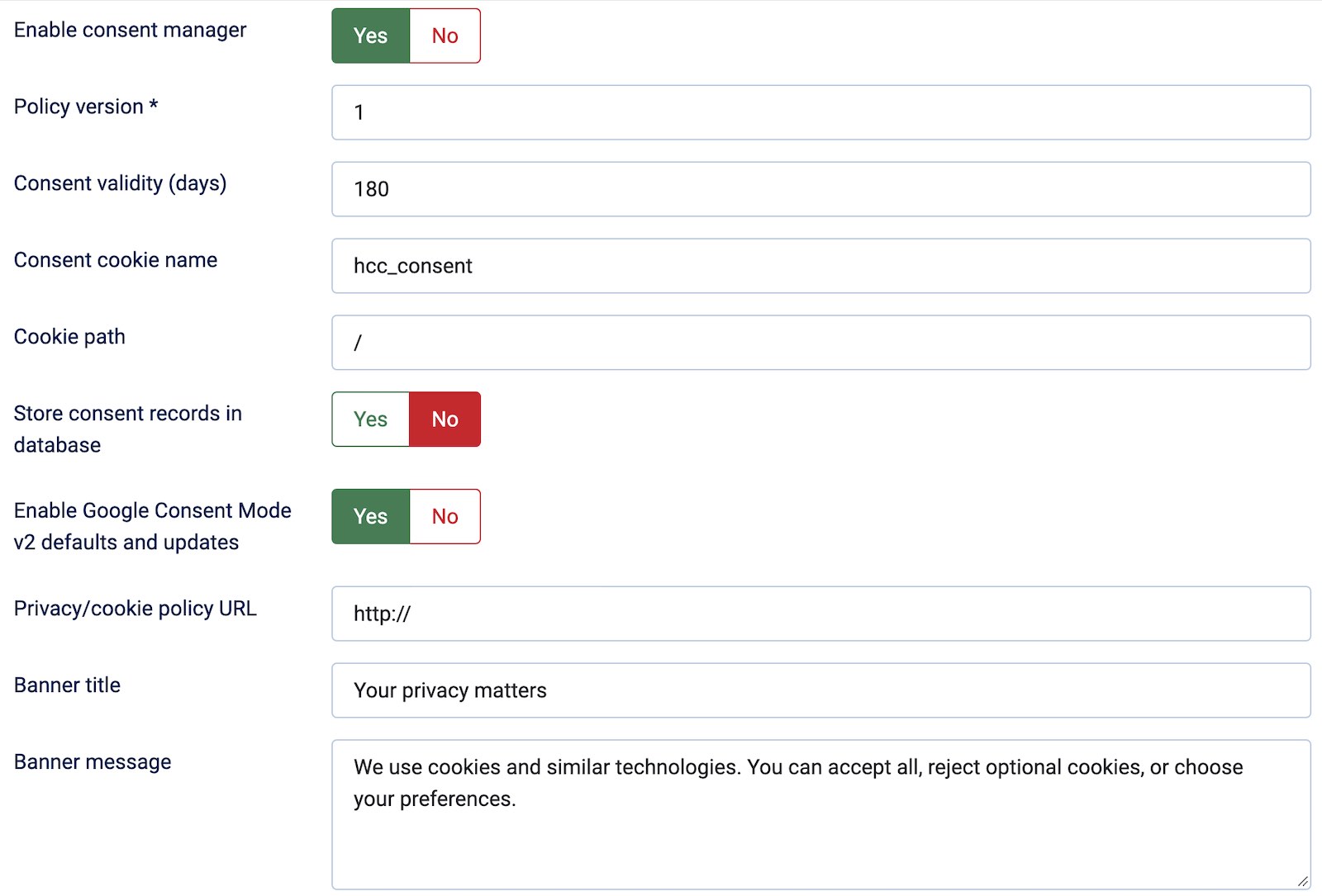
You can select the policy version that is active on your website. Next, consent validity determines how many days the consent will be active after a visitor clicks one of the Accept buttons. Also, you can select the consent cookie name and path. The plugin is compatible with Google Consent Mode v2, so you can enable it here.
This is the full list of all plugin parameters:
- Enable consent manager - Enable or disable the cookie consent banner.
- Policy version - The version number of your cookie policy. This can be changed occasionally.
- Consent validity - How many days after accepting the cookie consent banner would not be shown for the visitor.
- Cookie consent name - Name of the cookie that is saved on the visitor's computer.
- Cookie path - Controls which URLs on your site can access that cookie. The / means the whole site, including pages under paths such as /shop/.
- Store consent records in database - Enable this if you want to store visitors' consents in the Joomla database anonymously.
- Enable Google Consent Mode V2 defaults and updates - This is a framework that communicates a user's cookie and identifier consent choices to Google tags (such as Google Analytics 4 and Google Ads). Enable Google Consent or disable it here. When it's on, the plugin sends Google consent signals as visitors arrive and make choices:
- Before a choice is saved, it sets Google’s advertising and analytics storage signals to denied.
- When a valid consent cookie exists, it updates those signals to match the saved choices.
- When a visitor changes their choices, it saves them and sends another consent update.
- Privacy/cookie policy URL - If you have a page on your website for the privacy policy of your company, you can enter its URL here. The link will be added to the banner.
- Banner title - The title text on the cookie consent banner.
- Banner message - The textual message to be displayed on the cookie consent banner.
Saving Cookie Consents in Database
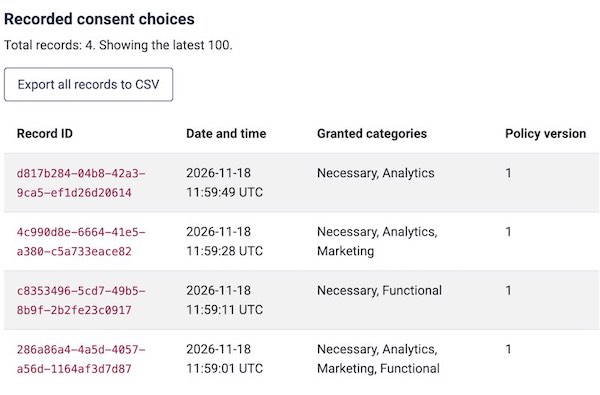
The Hot Cookie Consent Joomla plugin can save the visitors' selections in the Joomla database. This is optional, and it's disabled by default. If you enable it in the plugin parameters, the plugin will add a database entry for each visitor's selection, without storing the visitors' IP addresses and other sensitive data that can violate their privacy. The stored data can be reviewed on the plugin parameters page (the last 100 entries) or exported as a CSV file for your further analysis.
This is how the section with database entries looks:
GDPR Complience
The Hot Cookie Consent Joomla plugin can help you to achieve GDPR compliance for your website. The allowance for your visitor to allow or deny cookies is the first step in achieving the full GDPR complience that is especially important for EU-based companies. It's a plugin that can be configured in a minute, yet it offers a lot for your website. The plugin is also not unnecessarily disruptive for the visitors. With a single click or a couple of clicks, the visitor can change the cookie settings.