
- Thank you received: 0
Appearance problems
-
KARAGIANNIDIS
- Topic Author
- New Member
-

Less
More
13 years 10 months ago #20340
by KARAGIANNIDIS
Appearance problems was created by KARAGIANNIDIS
I have some small issues that I have to solve so my site will be ready.
1. How can I remove the tons from the 1st picture
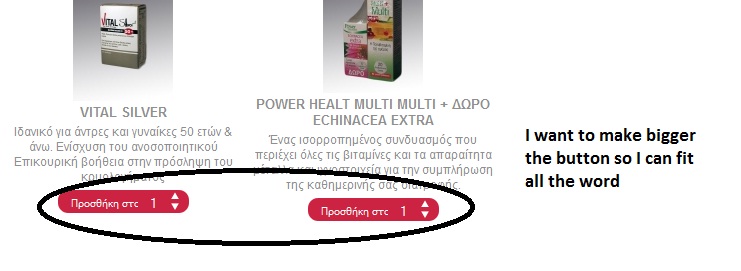
2. How can I make bigger the button ADD TO CART so it can fit a bigger word.
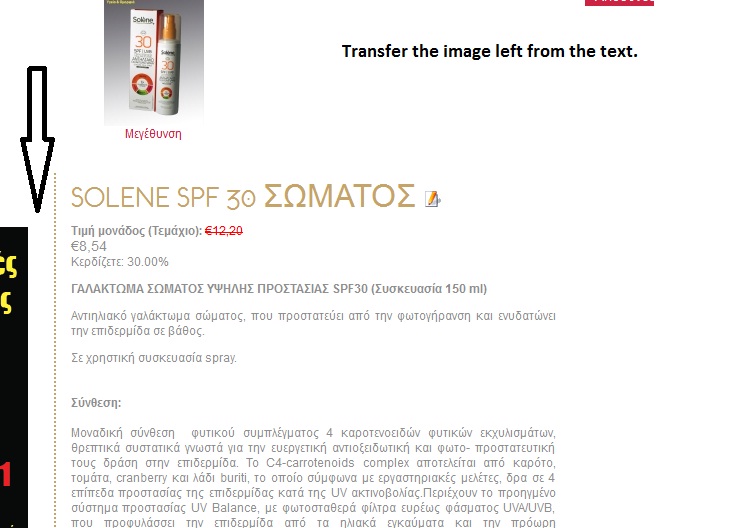
3. How can I transfer the image of the product , left from the description.
Thank you for your help. I will waiting your answer,
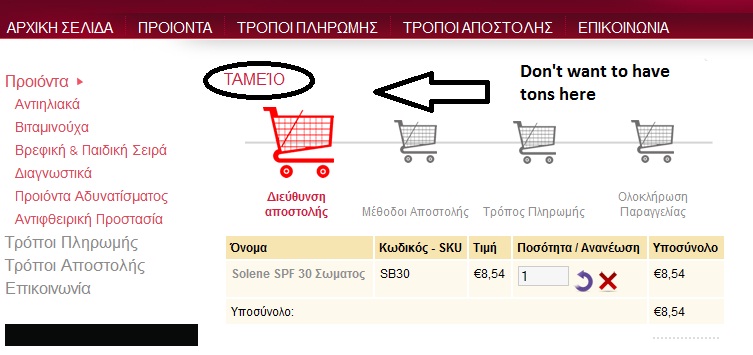
1. How can I remove the tons from the 1st picture
2. How can I make bigger the button ADD TO CART so it can fit a bigger word.
3. How can I transfer the image of the product , left from the description.
Thank you for your help. I will waiting your answer,
Please Log in to join the conversation.
-
ivan.milic
Support Staff - Offline
- Moderator
-

Less
More
- Posts: 14116
- Thank you received: 1639
13 years 10 months ago #20356
by ivan.milic
Replied by ivan.milic on topic Appearance problems
1. Make translation for label PHPSHOP_CHECKOUT_TITLE blank, it should be in:
administrator\components\com_virtuemart\languages\common\greek.php
and
administrator\components\com_virtuemart\languages\common\english.php
2. Open components\com_virtuemart\themes\hot_cosmetics\theme.css
you will find:
.addtocart_button, .notify_button {
text-align: center;
background-position: bottom left;
width: 80px;
height: 23px;
cursor: pointer;
border: none;
font-weight: normal;
vertical-align: middle;
overflow: hidden;
margin: 0;
padding: 0;
background: none;
float: left;
color: #585858;
font-size: 10px !important;
color: white;
text-transform: uppercase;
text-indent: 10px;
}
make width property have bigger value
3. components\com_virtuemart\themes\hot_cosmetics\templates\product_details\flypage_hot_cosmetics.tpl.php
needs to be edited.
administrator\components\com_virtuemart\languages\common\greek.php
and
administrator\components\com_virtuemart\languages\common\english.php
2. Open components\com_virtuemart\themes\hot_cosmetics\theme.css
you will find:
.addtocart_button, .notify_button {
text-align: center;
background-position: bottom left;
width: 80px;
height: 23px;
cursor: pointer;
border: none;
font-weight: normal;
vertical-align: middle;
overflow: hidden;
margin: 0;
padding: 0;
background: none;
float: left;
color: #585858;
font-size: 10px !important;
color: white;
text-transform: uppercase;
text-indent: 10px;
}
make width property have bigger value
3. components\com_virtuemart\themes\hot_cosmetics\templates\product_details\flypage_hot_cosmetics.tpl.php
needs to be edited.
Please Log in to join the conversation.
-
KARAGIANNIDIS
- Topic Author
- New Member
-
Less
More
- Thank you received: 0
13 years 10 months ago #20376
by KARAGIANNIDIS
Replied by KARAGIANNIDIS on topic Appearance problems
All has been done. Thank u. The only thing is althougt I change width, the word is so big it goes up in the arrow of the button. How can I change the word of the button and make it smaller.
And how can I disapear ... YOU HAVE ALSO SEE which appears down from the prodcut details?
Thanks once again for the help.
And how can I disapear ... YOU HAVE ALSO SEE which appears down from the prodcut details?
Thanks once again for the help.
Please Log in to join the conversation.

13 years 10 months ago #20393
by milos
Replied by milos on topic Appearance problems
You can make the button font (even) smaller if you change value in this line:
font-size: 10px !important;
font-size: 10px !important;
Please Log in to join the conversation.
13 years 9 months ago #21466
by narodk
Replied by narodk on topic Appearance problems
How do I get rid of this White line between the header and body?
Attachment sswhite-line.jpg not found
Please Log in to join the conversation.
-
ivan.milic
Support Staff - Offline
- Moderator
-
Less
More
- Posts: 14116
- Thank you received: 1639
13 years 9 months ago #21473
by ivan.milic
Replied by ivan.milic on topic Appearance problems
Hi,
open:
templates/hot_cosmetics/css/vm_cosmetics.css
find this:
.vertical-separator {
border-right: 2px dotted #D2D2D2;
}
replace it with this:
.vertical-separator {
border-right: none;
}
open:
templates/hot_cosmetics/css/vm_cosmetics.css
find this:
.vertical-separator {
border-right: 2px dotted #D2D2D2;
}
replace it with this:
.vertical-separator {
border-right: none;
}
Please Log in to join the conversation.
Time to create page: 0.118 seconds