

Turn your Joomla website into a dynamic, user-friendly content hub with the Hot Content Filter module — a powerful solution designed to help visitors find exactly what they’re looking for, instantly. The Hot Content Filter module lets you display articles in a clean, responsive grid, enhanced with intuitive category-based filtering. Visitors can switch between categories with a single click, without page reloads — making content browsing fast, smooth, and engaging.
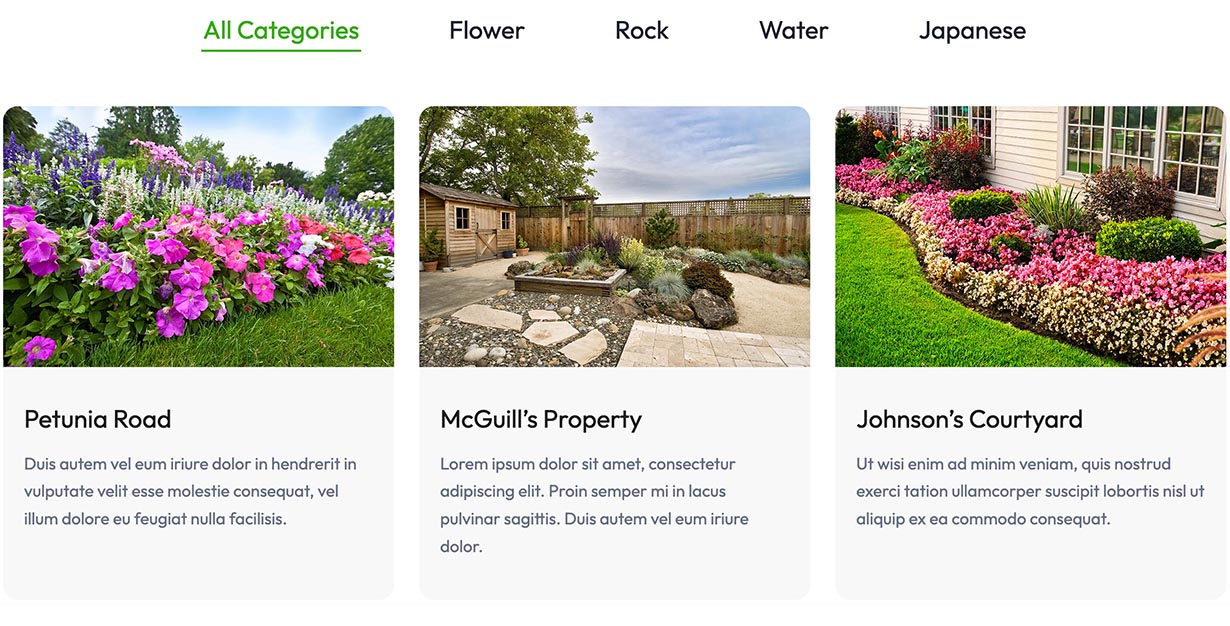
Fully Customizable Display
Adapt the module to perfectly match your website’s design and content strategy:
- Show selected categories only (with a dedicated All Categories tab)
- Choose the number of columns for desktop and enjoy automatic single-column layout on mobile
- Display or hide intro images, titles, intro text, and “Read More” links
Advanced Sorting Options
Control how your content is presented:
- Order articles by Newest, Oldest, Featured First, or Random
- Highlight important content or keep things fresh with dynamic ordering
Stylish Tabs & Smooth Animations
Make your filters visually appealing and interactive:
- Choose between Pills or Underline tab styles
- Adjust animation speed for seamless transitions between categories
- Create a modern UI that blends perfectly with our Joomla templates
Powered by smooth JavaScript filtering, the module updates content instantly when users click a category tab — improving usability and keeping visitors engaged longer. The module looks great on all devices. Whether your visitors are browsing on desktop, tablet, or smartphone, the layout adapts flawlessly for optimal readability and interaction. Developed with the latest Joomla standards in mind, the Hot Content Filter module integrates seamlessly into any Joomla website and works perfectly with modern templates.
This is the perfect module for blogs and magazines, portfolio and showcase websites, news portals, business and corporate sites.
Hot Content Filter Module Parameters
- Categories - Select the categories that will be used for content filtering.
- Number of Articles - How many articles to fetch from each category and how many articles to show on the module output.
- Number of Columns - How many columns to use on larger screens. The module will automatically use a single-column layout on mobile devices.
- Ordering - Display newest, oldest or featured articles first. Also, you can select articles randomly.
- Tab Style - There are two styles of the tab buttons: Pills or Underline.
- Animation Speed - Duration of the transition animation in milliseconds.
- Show intro image - Enable/disable the intro image in articles.
- Show heading - Enable/disable the heading image in articles.
- Show intro text - Enable/disable the intro text in articles.
- Show read more link - Enable/disable the read more link in articles.
- Read more text - Set link text for the read more links here.
- Intro text length - Maximum intro text length in characters. Set 0 to disable truncation.