
Whenever you have too long pages, for better user experience, it's recommended to separate it to the several subpages. This feature exists in Joomla from the early days. It's performed by the Pagebreak plugin that comes with default Joomla installation. However, in the later Joomla versions it's enhanced and has more power. The options are "hidden" in the Plugin Manager and many Joomla users don't even know they exist.
How to break a page using an old-school method
In the article editor you simply click the Page Break button wherever you like your page to be separated. In the pop-up window, you should enter the subpages name and anchor text of that subpage that will be used in the Table of Contents. Alternatively, if you prefer direct HTML editing, you can enter a code snippet in this form:
<hr title="Page 2" alt="Page 2" class="system-pagebreak" />
The result will be similar as on the following image:
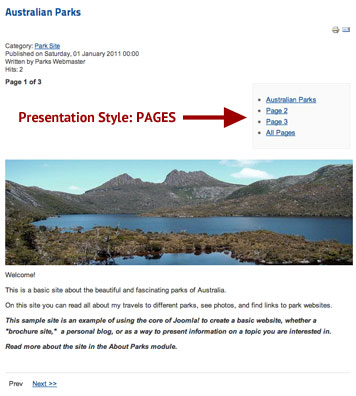 In the above code snippet, the title parameter is the subpage name and the alt parameter is the anchor text of the link used in the Table of Contents. The result of doing this is well known to all Joomla users. The Page Break plugin by default creates an unordered list and puts it in the box named as Article Index. This box usually floats right before the rest content of the page. Of course, you can modify its position if you create a template override. Also, you can modify the Article Index's style in template's CSS stylesheet if you modify (or add) these lines:
#article-index ul {
/* your CSS commands here */
}
#article-index li {
/* your CSS commands here */
}
Did you know you can use Sliders or Tabs to break a page?
Yes, you can since Joomla 1.6, even without installing any additional 3rd party extensions. All you need to do is to go to: Extensions > Plug-in Manager > Content - Pagebreak. You have several options in the plugin parameters that allows you to:
- Include or not include the subpage's titles in the title tag
- Show or hide the Article Index heading
- Change default heading of the Article Index
- Show or hide list of the subpages
- Show or hide "Show All Pages" link
The new option is Presentation Style. By default, it's set to Pages option, but you can also select Sliders or Tabs option. If you do that, all pages where you used the Page Break will look similar to one of these two examples:

Good user experience! Good for position of your site!
New presentation styles bring your users better experience and visually enhance and modernize your website. Even if you don't agree with that, you should consider using the new presentation styles for search engine optimization purposes.
Why your website is better optimized in this case? Well, because:
- The search engines does not like multiplication of content (the same content accessible through several different links). This is one of the biggest disadvantage of Joomla and with presentation style set to Pages in the Pagebreak plugin, it's even worse. You have the same content in the subpages and in the complete page display.
- The search engines (unlike your visitors) like long pages. With presentation style set to Sliders or Tabs, your visitors will see your big page separated and organized well. However, Google will index your page as one big page with a lot of content.