

Link is probably the most used HTML element. It connects two pages on the site or redirects the user from one website to another. It's a simple element that becomes one of the most important elements of each website over time. Links are today the technology behind the whole Internet marketing industry. The success of a website is measured by its link portfolio. A part of the link portfolio is links between the website pages (inbound links) and links that go to other websites (outbound links). Over time, the number of links that your Joomla website has can grow from dozens to thousands. There's no technology in Joomla that lets you analyze all these links. Therefore, we developed the Hot Link Checker Joomla component that keeps all your links in one place, allowing you to find, analyze, and edit links.
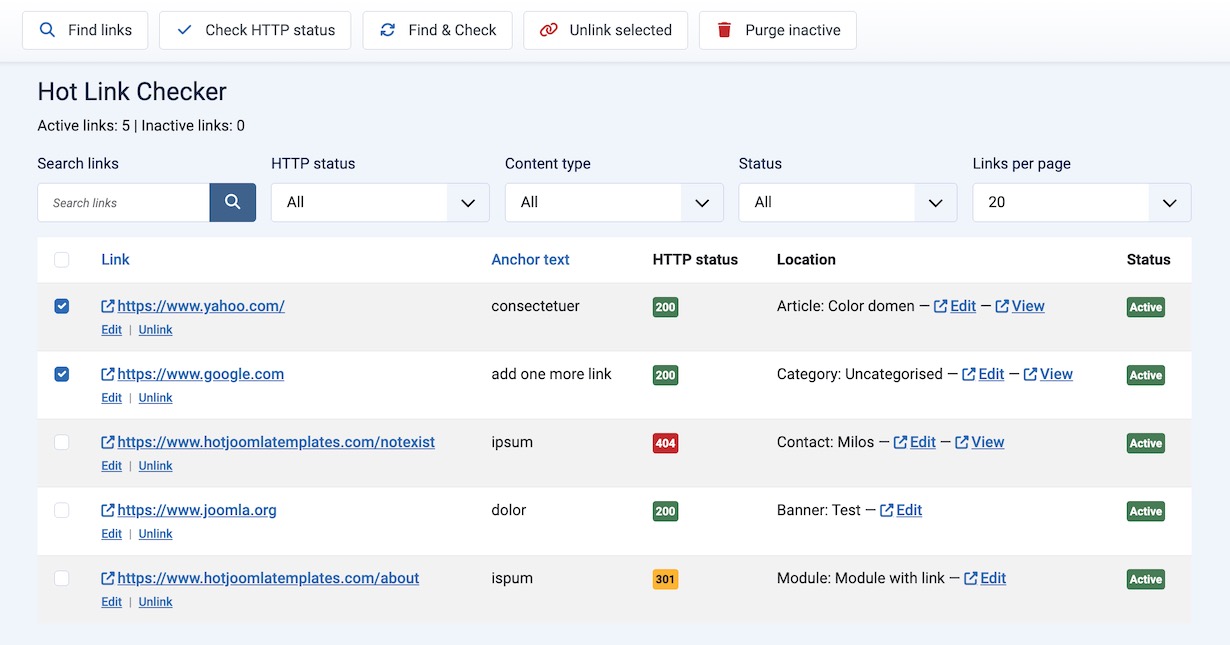
Find All Links of Joomla Website
The first thing the Hot Link Checker Joomla component can help you with is to find all the links that you included in your Joomla website over time. The component will scan all the content where the links can exist, such as articles, category descriptions, tag descriptions, banners, contacts, and custom modules. This operation is done with a single click on the "Find Links" button. When it's done, the entire link portfolio of your website is presented in a table of links.
You will be surprised how many links a website can contain. The component will probably find many links that you added a long time ago. Many of these links probably should be updated now or deleted.
On the other hand, the component may help you decide to add more links to the web pages that aren't linked. Links are there to help both your website visitors and search engines and AI bots discover the deeper parts of your website.
Check Links HTTP Statuses
What is a link HTTP status? Basically, this is the answer your browser receives when trying to access a web page. The HTTP statuses are marked with numbers. Here are some of the most common link statuses:
- 200 - OK, web page opens normally. All good.
- 301 - The web page is permanently moved to a new address. Consider updating the link.
- 302 - The web page is temporarily moved to the new address. Check the link status again after a period of time.
- 404 - The web page doesn't exist. It's a bad link, so consider removing it.
- ...and there are many others, but these are less often used.
When you finish the operation of finding the links, all links will have unknown status. Select one or more links and click the "Check HTTP Status" button. After checking all the links you selected, their status will be changed and marked with one of the numbers we mentioned above.
Now, you have a complete picture of your website's link profile. In one place, you will see the links that you may update or delete. And this is also something where the Hot Link Checker Joomla component can be helpful.
One-click Find Links and Check Link Statuses
It's possible to find all the links and check their statuses at once, as a single operation. To do this, you can click the "Find & Check" button. However, on larger websites with many links, this operation can take a lot of time because for each link status the component must wait for the response of the remote server. You must keep the component page open while the operation is performing. If you leave the page, it will be paused and will proceed once you get back to the component page.
Edit and Delete Links with Links Checker Joomla Component
The Hot Link Checker Joomla component lets you edit links in several ways. For each link entry in the component, you will see the link source in the Location column. The component will show the Joomla element where the link is found (article, tag, contact...) and let you edit the element directly by clicking on the Edit link. It will open the Joomla article editor (or tag editor, contact editor...) where you can find and update the link.
There's an even quicker way to edit the link directly from the Hot Link Checker, without opening the Joomla editor. In the Link column, under the link itself, there are small Edit links. Clicking on the Edit link opens a small modal window where you can enter an updated link. The updated link is then saved in the Joomla article (or tag, contact...) and the link status is updated.
Beside the small Edit link, there's an Unlink link. Clicking the Unlink link will remove the link element from the Joomla article (or tag, contact...), keeping only the anchor text. You can also unlink multiple links if you select them all and click the "Unlink Selected" button from the toolbar.
Active and Inactive Links
The last column of the Hot Link Checker shows the status of each link. After the initial operation of finding links, all links that are found are marked as active in the component's database. However, over time, as you edit Joomla content, you will probably update or remove some of the links. After the next finding links operation is performed, all the links that are missing will be set as inactive. This will help you to review the missing links.
After you confirm that you don't need the inactive links on your website anymore, you can purge all inactive links, and they will be removed from the component.
Filtering the Links
Large websites can contain hundreds or thousands of links. Finding a specific link on such websites may be challenging, so we included several filter tools in the Link Checker Joomla component. You can filter the links by:
- Search term: Enter a word, and the component will look for links that contain this word in the link or anchor text.
- HTTP status: Filter the links by status. For example, if you select 404, it will display the links whose target is not found.
- Content type: Show only links from articles, component descriptions, contact, banners, tags, or custom modules.
- Status: Show only active or inactive links.