


- Posts: 6989
- Thank you received: 746
Re: tabs hanging over the border
16 years 2 months ago #949
by milos
Replied by milos on topic Re: tabs hanging over the border
This can be done by centering the container element of the module position. So, you have to edit your template's index.php or css file and add text-align:center; or align="center" to the DIV (or TD) where your module position is located. Usually, it looks like this
In this sample, module position is user3 and you should center DIV with class "something" in your CSS file.
Code:
<div class="something">
<jdoc:include type="modules" name="user3" style="none" />
</div>
Please Log in to join the conversation.

16 years 2 months ago - 5 years 9 months ago #950
by vortex71
Replied by vortex71 on topic Re: tabs hanging over the border
Hi Milos,
thank you for your reply ...but I still need some help.
The module is located in BANNER1 position and here is the code line
I wrapped up with <center></center> so it look like
and it does center the module ...but also the pics go over the text area within the module
I want aslo if possible to add some space or border (please see image)
Thank you
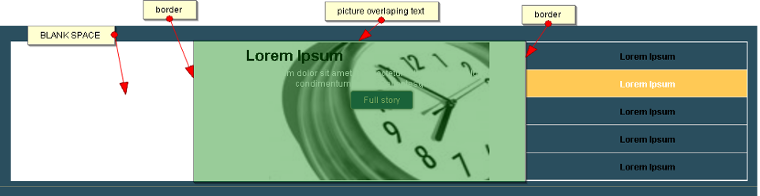
thank you for your reply ...but I still need some help.
The module is located in BANNER1 position and here is the code line
Code:
<jdoc:include type="modules" name="banner1" style="artstyle" artstyle="art-nostyle" />
I wrapped up with <center></center> so it look like
Code:
<center><jdoc:include type="modules" name="banner1" style="artstyle" artstyle="art-nostyle" /></center>
and it does center the module ...but also the pics go over the text area within the module
I want aslo if possible to add some space or border (please see image)
Thank you
Last edit: 5 years 9 months ago by milos.
Please Log in to join the conversation.
16 years 2 months ago #953
by milos
Replied by milos on topic Re: tabs hanging over the border
Now you should edit file style.css of the module and add text-align:center; parameter to all classes.
Please Log in to join the conversation.
16 years 2 months ago #991
by vortex71
Replied by vortex71 on topic Re: tabs hanging over the border
Hi Milos,
I'm sorry but actually I still have the same problems with tabs hanging over ..I thought I fix it
I need your help
I put padding :0; in the param (in the style.css )but no results
thanks
I'm sorry but actually I still have the same problems with tabs hanging over ..I thought I fix it
I need your help
I put padding :0; in the param (in the style.css )but no results
thanks
Please Log in to join the conversation.
16 years 2 months ago #994
by vortex71
Replied by vortex71 on topic Re: tabs hanging over the border
figure out ..need to put this in the template.css
#featured ul.ui-tabs-nav li, #featured li.ui-tabs-nav-item a {
margin:0;
}
thanks
#featured ul.ui-tabs-nav li, #featured li.ui-tabs-nav-item a {
margin:0;
}
thanks
Please Log in to join the conversation.
Time to create page: 0.113 seconds