
- Posts: 4
- Thank you received: 0
Off-canvas menu
-
military980
Inactive member - Topic Author
- Offline
- New Member
-

Less
More
4 months 2 weeks ago #52131
by military980
Off-canvas menu was created by military980
I was wondering if somebody could help me with a couple changes I would like to make to the off-canvas menu on the architecture template?
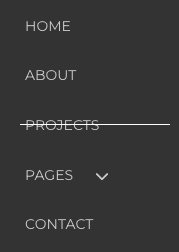
1) I would like to have the horizontal line in the off-canvas menu be above the word and not through it (like the text on the right hand side of the carousel)...how can I change it?
2) I would like to replace the three horizontal lines, that open the off-canvas menu, to my logo.
Any help or guidance would be very much appreciated.
1) I would like to have the horizontal line in the off-canvas menu be above the word and not through it (like the text on the right hand side of the carousel)...how can I change it?
2) I would like to replace the three horizontal lines, that open the off-canvas menu, to my logo.
Any help or guidance would be very much appreciated.

Please Log in to join the conversation.


4 months 2 weeks ago #52132
by milos
Replied by milos on topic Off-canvas menu
Hello,
1. Edit file /media/templates/site/architecture/css/custom.css and around line 108 change this:
to this:
2. In the same file, at the top of the file, add this:
Change logo_image.png with your actual logo image. Upload the logo image to the folder /media/templates/site/architecture/images. Change 42px 84px with the actual width and height of your logo image in pixels.
Regards,
Milos
1. Edit file /media/templates/site/architecture/css/custom.css and around line 108 change this:
Code:
ul.menu.offcanvas_sparky > li.active::before {
content: "";
display: block;
width: 150px;
height: 1px;
background: #fff;
position: absolute;
left: 40px;
margin-top: 9px;
}
to this:
Code:
ul.menu.offcanvas_sparky > li.active::before {
content: "";
display: block;
width: 150px;
height: 1px;
background: #fff;
position: absolute;
left: 40px;
margin-top: 0;
}
2. In the same file, at the top of the file, add this:
Code:
.offcanvas-btn {
background: url(../images/logo_image.png);
background-size: 42px 84px;
}
Change logo_image.png with your actual logo image. Upload the logo image to the folder /media/templates/site/architecture/images. Change 42px 84px with the actual width and height of your logo image in pixels.
Regards,
Milos
The following user(s) said Thank You: military980
Please Log in to join the conversation.
4 months 2 weeks ago #52133
by milos
Replied by milos on topic Off-canvas menu
One more thing, your logo image should actually contain the upper and lower parts. See this default menu icon image:
demo.hotjoomlatemplates.com/architecture...e/images/tinynav.png
The top part is the hamburger menu image. The lower part is the X image that is used to close the menu. So, in the top part of your image you should have your logo, and at the bottom part, the X image for closing the menu.
Regards,
Milos
The top part is the hamburger menu image. The lower part is the X image that is used to close the menu. So, in the top part of your image you should have your logo, and at the bottom part, the X image for closing the menu.
Regards,
Milos
The following user(s) said Thank You: military980
Please Log in to join the conversation.
-
military980
Inactive member - Topic Author
- Offline
- New Member
-
Less
More
- Posts: 4
- Thank you received: 0
4 months 2 weeks ago #52136
by military980
Replied by military980 on topic Off-canvas menu
Thank you for your help!
The icon that I made, per your instructions, comes out stretched. What is supposed to be a square, looks like a rectangle.
What kind of adjustments can I make to correct that?
The icon that I made, per your instructions, comes out stretched. What is supposed to be a square, looks like a rectangle.
What kind of adjustments can I make to correct that?
Please Log in to join the conversation.
4 months 2 weeks ago #52137
by milos
Replied by milos on topic Off-canvas menu
Hello,
You define the image size in this line:
So, make sure that your image size matches the size defined there. The first value is width, the second value is height. For more detailed info, I would need the link to your website so I can inspect the code.
Regards,
Milos
You define the image size in this line:
Code:
background-size: 42px 84px;
So, make sure that your image size matches the size defined there. The first value is width, the second value is height. For more detailed info, I would need the link to your website so I can inspect the code.
Regards,
Milos
Please Log in to join the conversation.
-
military980
Inactive member - Topic Author
- Offline
- New Member
-
Less
More
- Posts: 4
- Thank you received: 0
4 months 2 weeks ago #52143
by military980
Replied by military980 on topic Off-canvas menu
Thank you! Here's what I'm working on: sissel.studiocic.com
Please Log in to join the conversation.
Time to create page: 0.210 seconds