
- Posts: 149
- Thank you received: 2
Advanced Search Feature Assistance
-
aaroninbna
Inactive member -
 Topic Author
- Offline
- Member
-

Less
More
14 years 8 months ago #10374
by aaroninbna
Does anyone have a good link to educate me when trying to setup an advanced search feature ?
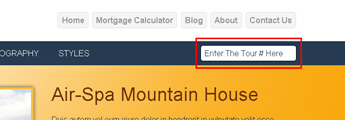
I am using the RealEstate template (v1.6) and want my visitors to be able to search for an article using a "tour#". On my website's Search Module (user4), I have the default wording, [Enter Tour# Here]. This "tour#" is a alpha numeric name associated with a specific article. The article is a video virtual tour of homes in my area. I have yard signs to be placed next to the realtor's sign in the customer's front yard. When someone looks up the primary realestate website or drives by the home, a reference number (i.e. tour#) is shown. The visitor can enter this number and be forwarded to the proper article for details on the home of interest.
Thank you all in advance,
Aaron
Advanced Search Feature Assistance was created by aaroninbna
Does anyone have a good link to educate me when trying to setup an advanced search feature ?
I am using the RealEstate template (v1.6) and want my visitors to be able to search for an article using a "tour#". On my website's Search Module (user4), I have the default wording, [Enter Tour# Here]. This "tour#" is a alpha numeric name associated with a specific article. The article is a video virtual tour of homes in my area. I have yard signs to be placed next to the realtor's sign in the customer's front yard. When someone looks up the primary realestate website or drives by the home, a reference number (i.e. tour#) is shown. The visitor can enter this number and be forwarded to the proper article for details on the home of interest.
Thank you all in advance,
Aaron
Please Log in to join the conversation.
-
ivan.milic
Support Staff - Offline
- Moderator
-

Less
More
- Posts: 14116
- Thank you received: 1639
14 years 8 months ago #10397
by ivan.milic
Replied by ivan.milic on topic Re: Advanced Search Feature Assistance
You use some 3d-rd party extension?
Please Log in to join the conversation.
-
aaroninbna
Inactive member -
Topic Author
- Offline
- Member
-
Less
More
- Posts: 149
- Thank you received: 2
14 years 6 months ago #11346
by aaroninbna
Replied by aaroninbna on topic Re: Advanced Search Feature Assistance
No third party, only default
Please Log in to join the conversation.
-
aaroninbna
Inactive member -
Topic Author
- Offline
- Member
-
Less
More
- Posts: 149
- Thank you received: 2
14 years 4 months ago #12923
by aaroninbna
Replied by aaroninbna on topic Re: Advanced Search Feature Assistance
Would a "input-button" serve my purpose? I don't want to use a drop down list or offer the visitors numerous choices.
I have been banging my head to no avail.
I have been banging my head to no avail.
Please Log in to join the conversation.
-
ivan.milic
Support Staff - Offline
- Moderator
-
Less
More
- Posts: 14116
- Thank you received: 1639
14 years 4 months ago #12928
by ivan.milic
Replied by ivan.milic on topic Re: Advanced Search Feature Assistance
Try something like this:
firts put this in custom HTML module:
<input type="text" id="adv_vsearch" placeholder="Enter The Tour# Here" />
then add to head section of index.php of template:
let me just explain:
window.location = "first part of link" + jQuery('#adv_vsearch').val() + "second part of link";
you need to modify.
For example if link to some tour article (article id is 150) is:
http://www.somesite.com?id=150&view=user
then it would be:
window.location = "http://www.somesite.com?id=" + jQuery('#adv_vsearch').val() + "&view=user";
firts put this in custom HTML module:
<input type="text" id="adv_vsearch" placeholder="Enter The Tour# Here" />
then add to head section of index.php of template:
Code:
<script type="text/javascript">
jQuery(document).ready(function(){
jQuery('#adv_vsearch').keydown(function(event){
var keycode = -1;
if (window.event) keycode = window.event.keyCode;
else if (event) keycode = event.which;
if(keycode == 13)// 13 is enter key
{
window.location = "first part of link" + jQuery('#adv_vsearch').val() + "second part of link";
}
return true;
});
});
</script>
let me just explain:
window.location = "first part of link" + jQuery('#adv_vsearch').val() + "second part of link";
you need to modify.
For example if link to some tour article (article id is 150) is:
http://www.somesite.com?id=150&view=user
then it would be:
window.location = "http://www.somesite.com?id=" + jQuery('#adv_vsearch').val() + "&view=user";
The following user(s) said Thank You: aaroninbna
Please Log in to join the conversation.
-
aaroninbna
Inactive member -
Topic Author
- Offline
- Member
-
Less
More
- Posts: 149
- Thank you received: 2
14 years 4 months ago #12962
by aaroninbna
Replied by aaroninbna on topic Re: Advanced Search Feature Assistance
Thank you so much
Please Log in to join the conversation.
Time to create page: 0.173 seconds