

- Posts: 3
- Thank you received: 0
Carousel showing just a sliver of images
13 years 2 months ago #28334
by frankdl98
Carousel showing just a sliver of images was created by frankdl98
I'm trying Hot Joomla Carousel Pro on a development site, and the carousel is only showing a thin strip of each image. I tried changing size parameters, loading / not loading jQuery from the module, etc., but always get the same display.
callir.com/index.php
A sample is here: callir.com/images/homeslider/homeslider1.jpg
(Ignore the way the rest of the page looks. This is just a test site.)
callir.com/index.php
A sample is here: callir.com/images/homeslider/homeslider1.jpg
(Ignore the way the rest of the page looks. This is just a test site.)
Please Log in to join the conversation.
-
ivan.milic
Support Staff - Offline
- Moderator
-

Less
More
- Posts: 14116
- Thank you received: 1639
13 years 2 months ago #28336
by ivan.milic
Replied by ivan.milic on topic Carousel showing just a sliver of images
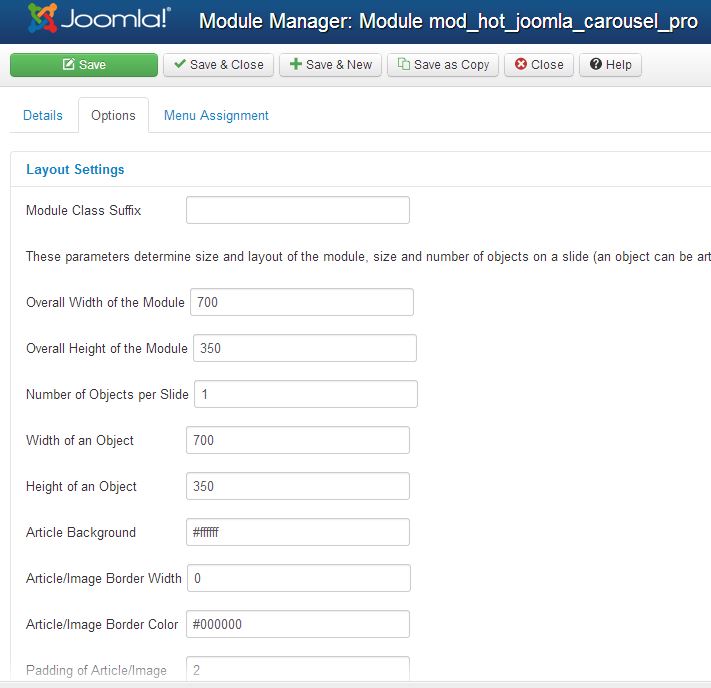
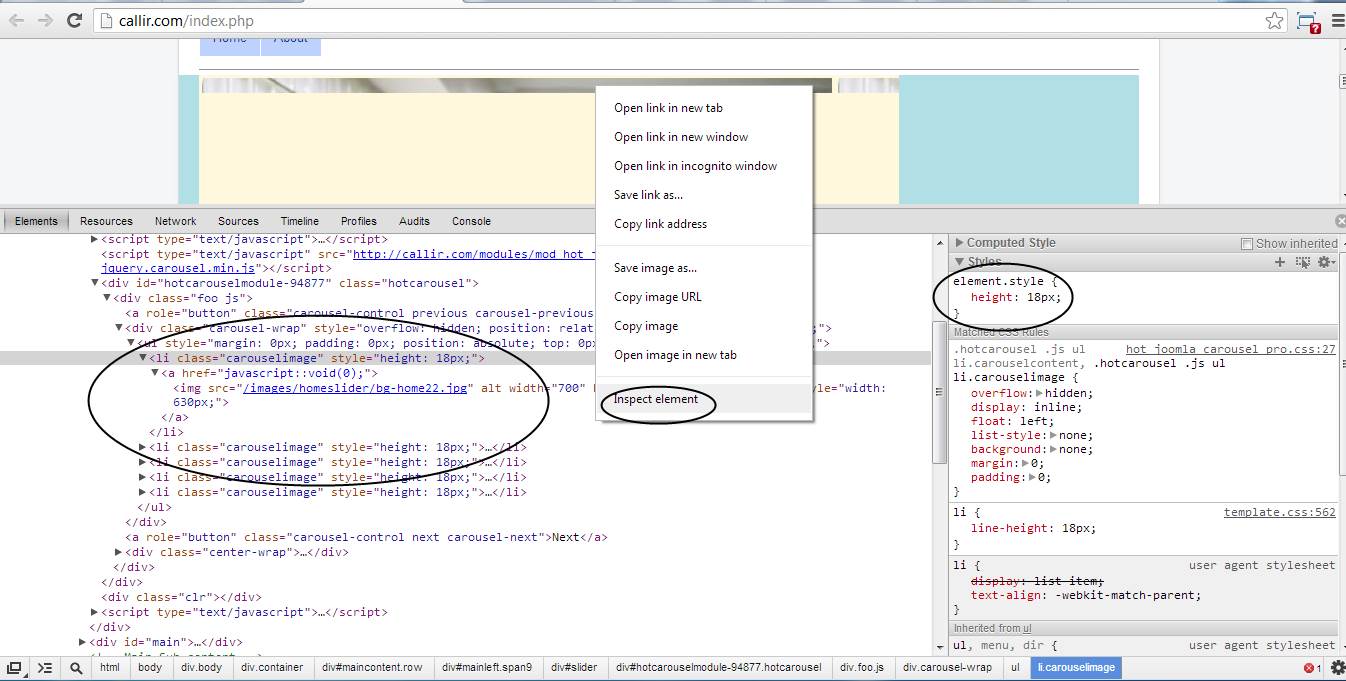
You set it like this , when I inspect source I see you set 18px for item height
Please Log in to join the conversation.
13 years 2 months ago #28341
by frankdl98
Replied by frankdl98 on topic Carousel showing just a sliver of images
Where do you see that?
Please Log in to join the conversation.
-
ivan.milic
Support Staff - Offline
- Moderator
-
Less
More
- Posts: 14116
- Thank you received: 1639
13 years 2 months ago #28354
by ivan.milic
Replied by ivan.milic on topic Carousel showing just a sliver of images
Google chrome inspect element, maybe some other thing on that page sets it like that. See image
Please Log in to join the conversation.
13 years 2 months ago #28371
by frankdl98
Replied by frankdl98 on topic Carousel showing just a sliver of images
The code for "carousel-wrap" comes from the module. Where is is getting the 18px setting from? I already sent you a screenshot of the module settings, and there isn't anything set to 18px.
<div class="carousel-wrap" style="overflow: hidden; position: relative; width: 636px; height: 18px;"><ul style="margin: 0px; padding: 0px; position: absolute; top: 0px; width: 3180px; left: -1908px;">
<li class="carouselimage" style="height: 18px;"><a href="javascript::void(0);"><img src="/images/homeslider/bg-home22.jpg" alt="" width="700" height="350" class="reflect" style="width: 630px;"></a></li>
<li class="carouselimage" style="height: 18px;"><a href="javascript::void(0);"><img src="/images/homeslider/bg-home4.jpg" alt="" width="700" height="350" class="reflect" style="width: 630px;"></a></li>
<li class="carouselimage" style="height: 18px;"><a href="javascript::void(0);"><img src="/images/homeslider/homeslider1.jpg" alt="" width="700" height="350" class="reflect" style="width: 630px;"></a></li>
<li class="carouselimage" style="height: 18px;"><a href="javascript::void(0);"><img src="/images/homeslider/homeslider2.jpg" alt="" width="700" height="350" class="reflect" style="width: 630px;"></a></li>
<li class="carouselimage" style="height: 18px;"><a href="javascript::void(0);"><img src="/images/homeslider/homeslider2.jpg" alt="" width="700" height="350" class="reflect" style="width: 630px;"></a></li>
</ul></div>
<div class="carousel-wrap" style="overflow: hidden; position: relative; width: 636px; height: 18px;"><ul style="margin: 0px; padding: 0px; position: absolute; top: 0px; width: 3180px; left: -1908px;">
<li class="carouselimage" style="height: 18px;"><a href="javascript::void(0);"><img src="/images/homeslider/bg-home22.jpg" alt="" width="700" height="350" class="reflect" style="width: 630px;"></a></li>
<li class="carouselimage" style="height: 18px;"><a href="javascript::void(0);"><img src="/images/homeslider/bg-home4.jpg" alt="" width="700" height="350" class="reflect" style="width: 630px;"></a></li>
<li class="carouselimage" style="height: 18px;"><a href="javascript::void(0);"><img src="/images/homeslider/homeslider1.jpg" alt="" width="700" height="350" class="reflect" style="width: 630px;"></a></li>
<li class="carouselimage" style="height: 18px;"><a href="javascript::void(0);"><img src="/images/homeslider/homeslider2.jpg" alt="" width="700" height="350" class="reflect" style="width: 630px;"></a></li>
<li class="carouselimage" style="height: 18px;"><a href="javascript::void(0);"><img src="/images/homeslider/homeslider2.jpg" alt="" width="700" height="350" class="reflect" style="width: 630px;"></a></li>
</ul></div>
Please Log in to join the conversation.
-
ivan.milic
Support Staff - Offline
- Moderator
-
Less
More
- Posts: 14116
- Thank you received: 1639
13 years 2 months ago #28382
by ivan.milic
Replied by ivan.milic on topic Carousel showing just a sliver of images
Try this add this css at bottom of template_css.css:
.carouselimage{
height:320px!important;
}
.carouselimage{
height:320px!important;
}
Please Log in to join the conversation.
Time to create page: 0.249 seconds