

- Posts: 66
- Thank you received: 0
color menu logo
5 months 4 days ago #52097
by info9838
color menu logo was created by info9838
Hello,
I made a menu module for mobile but I think that the menu logo is white on white background and then it can't be seen...
My site is www.kine-forest.be . The main menu mobile is on top2
What can I do?
Best Regards,
Michael
I made a menu module for mobile but I think that the menu logo is white on white background and then it can't be seen...
My site is www.kine-forest.be . The main menu mobile is on top2
What can I do?
Best Regards,
Michael
Please Log in to join the conversation.


5 months 3 days ago #52098
by milos
Replied by milos on topic color menu logo
Hello,
First, the caching plugin jSpeed you are using is making errors that I can see in the browser console (missing files). Also, in the CSS, I can see that the browser is looking for a cached menu icon file that doesn't exist. I think you should not be using the jSpeed plugin because it makes errors on your website.
In the cached CSS file:
your site is looking for a cached icon file:
that doesn't exist.
So, it's not a white icon on a white background problem.
Regards,
Milos
First, the caching plugin jSpeed you are using is making errors that I can see in the browser console (missing files). Also, in the CSS, I can see that the browser is looking for a cached menu icon file that doesn't exist. I think you should not be using the jSpeed plugin because it makes errors on your website.
In the cached CSS file:
Code:
https://www.kine-forest.be/media/plg_jspeed/cache/css/8949715d365f9bd38ddea77b50a2116e_1.css
your site is looking for a cached icon file:
Code:
https://www.kine-forest.be/media/plg_jspeed/cache/images/83f861713dbe449f11b3c53a4d53f64d40ff4b91.webp
that doesn't exist.
So, it's not a white icon on a white background problem.
Regards,
Milos
Please Log in to join the conversation.
5 months 3 days ago #52099
by info9838
Replied by info9838 on topic color menu logo
Hello,
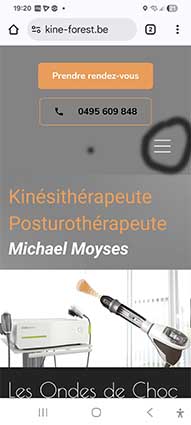
I did a module running only on mobile (top 2 main menu mobile)
If I use a background color, you can see the item menu white in the right (see attachement).
Is it posssible to change the color of this item menu and to place it in the center.
Thank you
I did a module running only on mobile (top 2 main menu mobile)
If I use a background color, you can see the item menu white in the right (see attachement).
Is it posssible to change the color of this item menu and to place it in the center.
Thank you
Please Log in to join the conversation.
5 months 2 days ago #52103
by milos
Replied by milos on topic color menu logo
Hello,
The header background color is defined in the file /media/templates/site/furniturestore/css/custom.css, around line 64. You can change it here:
If you want a plain color, change it to this, for example, for a black color:
To make it centered, you must have the menu in a seperate row. In the layout that you have, you can just try negative left margin. In the same file, around line 415, disable floating and change the left margin to a negative value here:
to this:
I am not sure which value is appropriate for mobile devices. You can experiment with negative values.
Regards,
Milos
The header background color is defined in the file /media/templates/site/furniturestore/css/custom.css, around line 64. You can change it here:
Code:
.header_row {
position: relative;
z-index: 1;
background: #707070 url(../images/header_bg.png) top center no-repeat;
background-size: cover;
}
If you want a plain color, change it to this, for example, for a black color:
Code:
.header_row {
position: relative;
z-index: 1;
background: #000000;
}
To make it centered, you must have the menu in a seperate row. In the layout that you have, you can just try negative left margin. In the same file, around line 415, disable floating and change the left margin to a negative value here:
Code:
.nav-toggle {
background: url(../images/tinynav_white.png);
background-size: 42px 84px;
margin-right: 15px;
margin-bottom: 15px;
}
to this:
Code:
.nav-toggle {
background: url(../images/tinynav_white.png);
background-size: 42px 84px;
margin-right: 15px;
margin-bottom: 15px;
float: none;
margin-left: -100px;
}
I am not sure which value is appropriate for mobile devices. You can experiment with negative values.
Regards,
Milos
Please Log in to join the conversation.
5 months 1 day ago #52108
by info9838
Replied by info9838 on topic color menu logo
Hello;
For the color item, I just used images/tinynav.png and not images/tinynav-white.png
To center I used this code
.nav-toggle {
background: url(../images/tinynav.png);
background-size: 42px 84px;
position: absolute;
left: 50%;
transform: translateX(-50%);
}
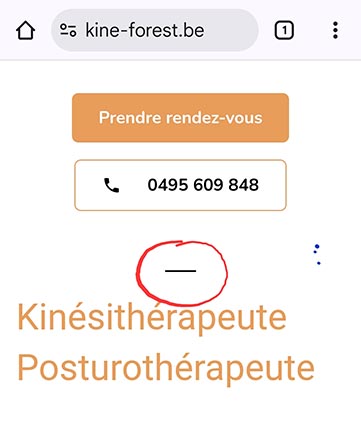
because with the negative marge that didn't work, now the icone is black and in the center BUT not entire, only the first line of the icone... what can I do?
Regards,
Michael
For the color item, I just used images/tinynav.png and not images/tinynav-white.png
To center I used this code
.nav-toggle {
background: url(../images/tinynav.png);
background-size: 42px 84px;
position: absolute;
left: 50%;
transform: translateX(-50%);
}
because with the negative marge that didn't work, now the icone is black and in the center BUT not entire, only the first line of the icone... what can I do?
Regards,
Michael
Please Log in to join the conversation.
Time to create page: 0.204 seconds