

- Posts: 4
- Thank you received: 0
Warning: mkdir()
15 years 5 days ago #8697
by Drayton
Warning: mkdir() was created by Drayton
Hi, I have a new install of this module / component. I have created a directory for the images and have directed the module where to get the images.. however, I have this error:
Warning: mkdir() [function.mkdir]: No such file or directory in /home/william/public_html/dev/modules/mod_hot_lightbox/tmpl/default.php on line 141
Warning: opendir(/dev/images/g1/) [function.opendir]: failed to open dir: No such file or directory in /home/william/public_html/dev/modules/mod_hot_lightbox/tmpl/default.php on line 117
There are no images in this gallery.
I have looked at the lines in default.php - it looks like the module is NOT creating the /thumbs directory.
Was I supposed to set some permissions somewhere?
Thanks!
williamstoneproperties.com/dev/
Warning: mkdir() [function.mkdir]: No such file or directory in /home/william/public_html/dev/modules/mod_hot_lightbox/tmpl/default.php on line 141
Warning: opendir(/dev/images/g1/) [function.opendir]: failed to open dir: No such file or directory in /home/william/public_html/dev/modules/mod_hot_lightbox/tmpl/default.php on line 117
There are no images in this gallery.
I have looked at the lines in default.php - it looks like the module is NOT creating the /thumbs directory.
Was I supposed to set some permissions somewhere?
Thanks!
williamstoneproperties.com/dev/
Please Log in to join the conversation.
-
ivan.milic
Support Staff - Offline
- Moderator
-

Less
More
- Posts: 14116
- Thank you received: 1639
15 years 5 days ago #8710
by ivan.milic
Replied by ivan.milic on topic Re: Warning: mkdir()
Yes that is the problem. CHMOD image folder to 777. If your hosting control panel does not support changing chmod install joomla!explorer component.
Please Log in to join the conversation.
15 years 5 days ago #8711
by Drayton
Replied by Drayton on topic Re: Warning: mkdir()
I did that already.. still no luck...
Anything else that could be causing it? I have checked cpanel error logs.. no errors seem to be referenced....
Anything else that could be causing it? I have checked cpanel error logs.. no errors seem to be referenced....
Please Log in to join the conversation.
15 years 5 days ago #8714
by Drayton
Replied by Drayton on topic Re: Warning: mkdir()
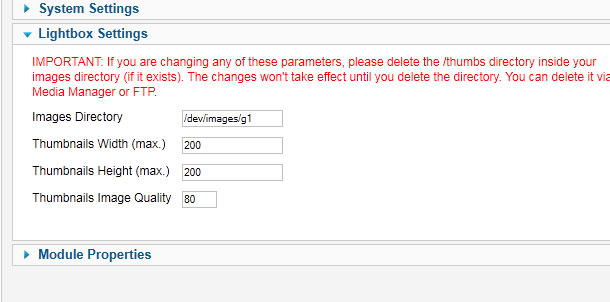
I have SSH'd into the domain.. I have made sure that the /images and /images/g1 directories are 777.
I am attaching a screen shot of my admin panel...
Did I forget something?
I am attaching a screen shot of my admin panel...
Did I forget something?
Please Log in to join the conversation.
-
ivan.milic
Support Staff - Offline
- Moderator
-
Less
More
- Posts: 14116
- Thank you received: 1639
15 years 5 days ago - 15 years 5 days ago #8716
by ivan.milic
Replied by ivan.milic on topic Re: Warning: mkdir()
Maybe your path is bad, what is the name of your joomla root folder?
Try with different folder, use:
images/stories/test
(note: create folder named "test" and put images in it)
Try with different folder, use:
images/stories/test
(note: create folder named "test" and put images in it)
Last edit: 15 years 5 days ago by ivan.milic.
Please Log in to join the conversation.
-
ivan.milic
Support Staff - Offline
- Moderator
-
Less
More
- Posts: 14116
- Thank you received: 1639
15 years 5 days ago #8717
by ivan.milic
Replied by ivan.milic on topic Re: Warning: mkdir()
mmm. I think you should remove "dev/" if that is your joomla root
Please Log in to join the conversation.
Time to create page: 0.216 seconds