

- Posts: 13
- Thank you received: 0
Re: Position style
14 years 1 month ago #17990
by Gabri
Replied by Gabri on topic Re: Position style
Hi, now the formatting is ok (font, aligment) but the background still remainsl white instead of red and grey.
You can see here: joomla.gdvpixel.com
Modules "Sondaggi, Cerca and Contatti" are in advert position, "statistiche" is in right posititon..
If you want or if it helps, I can send you an Administrator account.
Thanks
You can see here: joomla.gdvpixel.com
Modules "Sondaggi, Cerca and Contatti" are in advert position, "statistiche" is in right posititon..
If you want or if it helps, I can send you an Administrator account.
Thanks
Please Log in to join the conversation.
-
ivan.milic
Support Staff - Offline
- Moderator
-

Less
More
- Posts: 14116
- Thank you received: 1639
14 years 1 month ago #17993
by ivan.milic
Replied by ivan.milic on topic Re: Position style
I don't see "Sondaggi, Cerca and Contatti" , "statistiche" is gradient gray ??
Please Log in to join the conversation.
14 years 1 month ago #17998
by Gabri
Replied by Gabri on topic Re: Position style
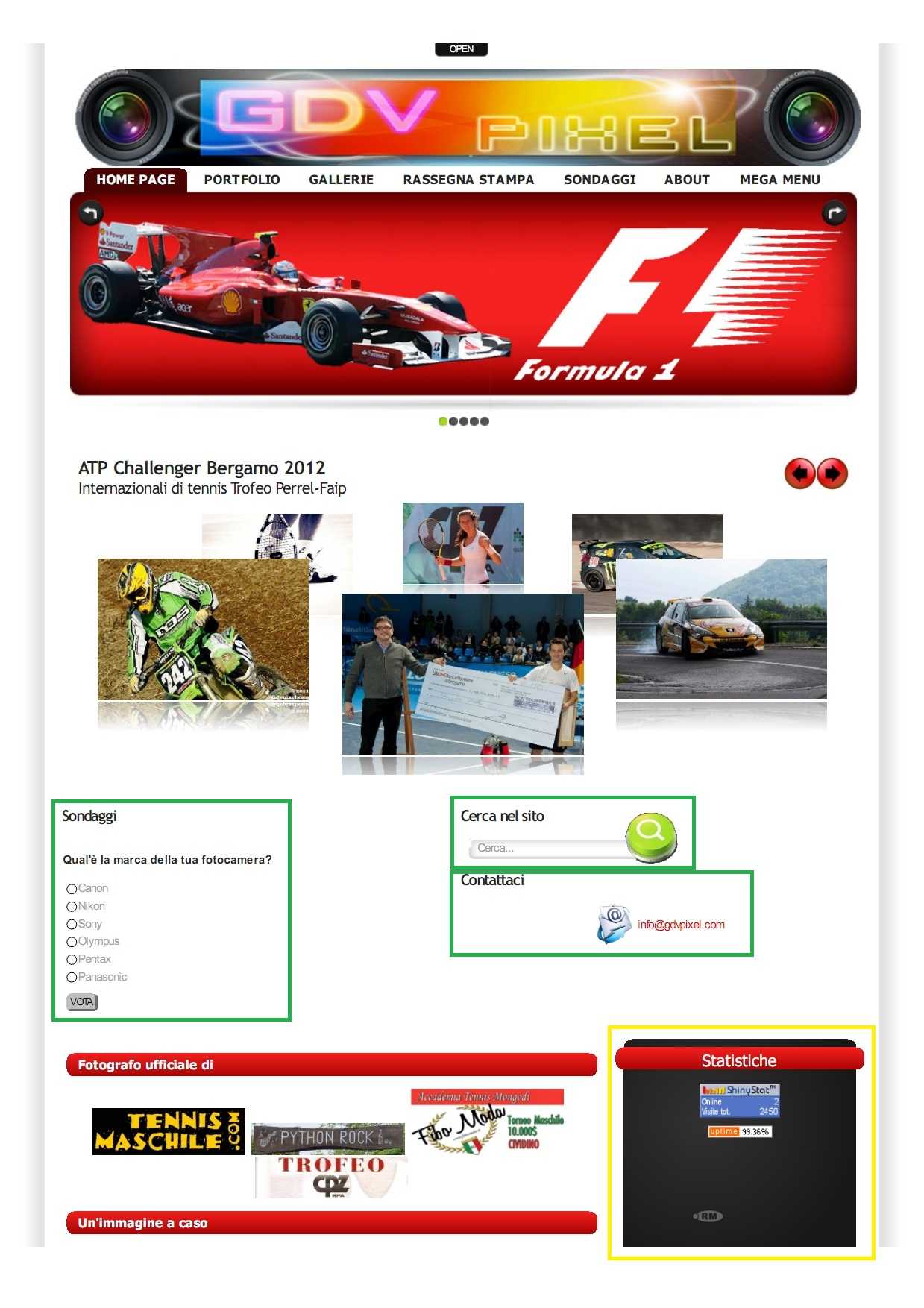
I've attached an image of the website.
The green module are in advert 1/2 position, the yellow is in right position.
I want to made the advert like the right (red and grey) but keeping the advert position (they have to stay side by side).
Thanks
The green module are in advert 1/2 position, the yellow is in right position.
I want to made the advert like the right (red and grey) but keeping the advert position (they have to stay side by side).
Thanks
Please Log in to join the conversation.
-
ivan.milic
Support Staff - Offline
- Moderator
-
Less
More
- Posts: 14116
- Thank you received: 1639
14 years 1 month ago #18012
by ivan.milic
Replied by ivan.milic on topic Re: Position style
like you added:
.bottom div.module-style ..
add
.upper div.module-style ..
or simply
div.module-style ..
to affect all modules no mater in which part of page
.bottom div.module-style ..
add
.upper div.module-style ..
or simply
div.module-style ..
to affect all modules no mater in which part of page
Please Log in to join the conversation.
14 years 1 month ago #18029
by Gabri
Replied by Gabri on topic Re: Position style
I've made, but nothing change.. The background still remains white
Please Log in to join the conversation.
-
ivan.milic
Support Staff - Offline
- Moderator
-
Less
More
- Posts: 14116
- Thank you received: 1639
14 years 1 month ago #18038
by ivan.milic
Replied by ivan.milic on topic Re: Position style
You forgot commas :
div.module-style3
.column_left div.moduletable-style3,...
it should be:
div.module-style3 ,
.column_left div.moduletable-style3,...
div.module-style3
.column_left div.moduletable-style3,...
it should be:
div.module-style3 ,
.column_left div.moduletable-style3,...
Please Log in to join the conversation.
Time to create page: 0.154 seconds