

- Posts: 7
- Thank you received: 0
Inserting a new image in template
15 years 1 month ago #7419
by munit
Replied by munit on topic Re: Inserting a new image in template
Hi,
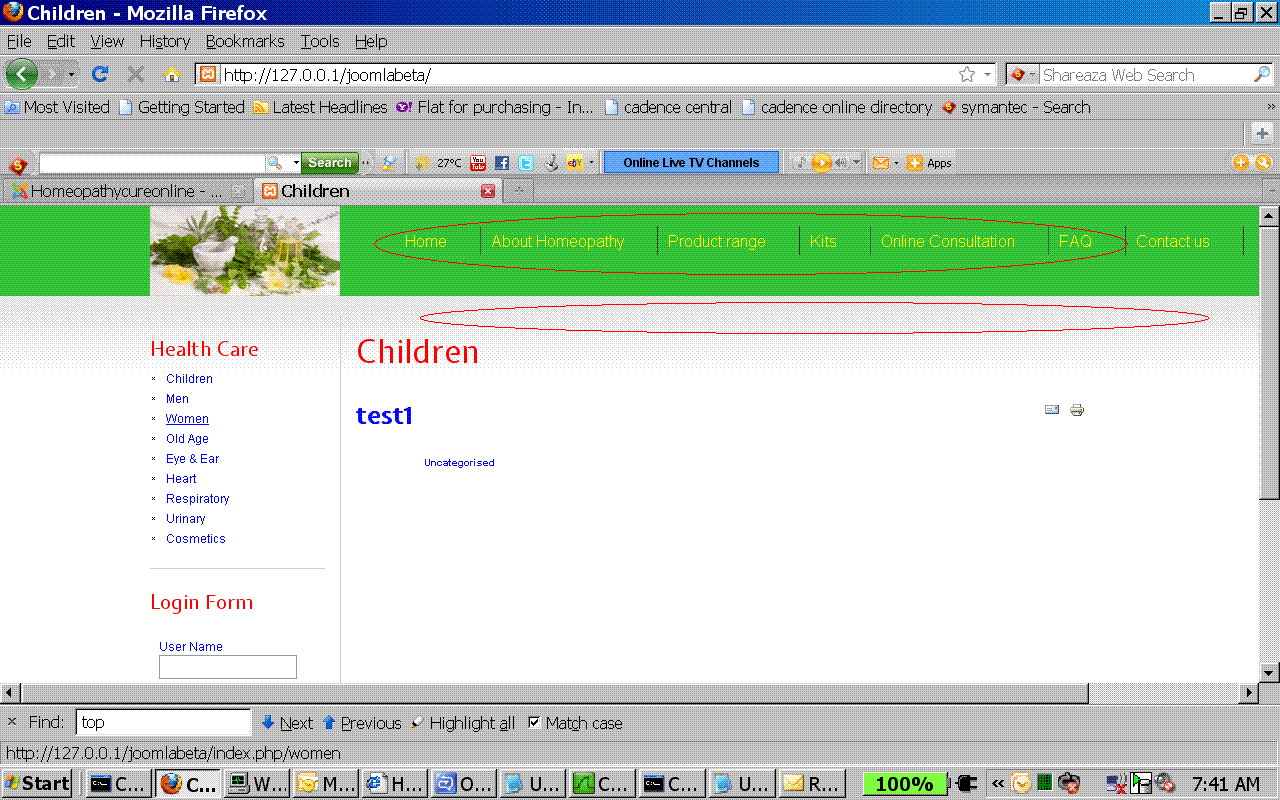
Currently my site is not online. I have attached the screen shot here.
a) The circle one has top menu items which I want to change the font size.
b) Secondly the online consultation option, I want to make it appear in 2 lines rather then a single line.
c) The second circle which I have put in the gif file shows that some background image is reflecting on the home page in grey color. We want to remove that Image.
Currently my site is not online. I have attached the screen shot here.
a) The circle one has top menu items which I want to change the font size.
b) Secondly the online consultation option, I want to make it appear in 2 lines rather then a single line.
c) The second circle which I have put in the gif file shows that some background image is reflecting on the home page in grey color. We want to remove that Image.
Please Log in to join the conversation.
-
ivan.milic
Support Staff - Offline
- Moderator
-

Less
More
- Posts: 14116
- Thank you received: 1639
15 years 1 month ago - 15 years 1 month ago #7430
by ivan.milic
Replied by ivan.milic on topic Re: Inserting a new image in template
a) file: template_css.css
#nav a {
font-size: 16px;
font-weight: normal;
}
b) ul#nav li:nth-child(5) {
width:50px;/*You may need to change this , until it breaks as you would like*/
}
/*note that this is not compatible with IE under version 9*/
/*you can use some browser debugger like chrome, inspect element option to find out id if li containing that menu option and then instead of "ul#nav li:nth-child(5)" you can use "#id" */
c) can not help without link
#nav a {
font-size: 16px;
font-weight: normal;
}
b) ul#nav li:nth-child(5) {
width:50px;/*You may need to change this , until it breaks as you would like*/
}
/*note that this is not compatible with IE under version 9*/
/*you can use some browser debugger like chrome, inspect element option to find out id if li containing that menu option and then instead of "ul#nav li:nth-child(5)" you can use "#id" */
c) can not help without link
Last edit: 15 years 1 month ago by ivan.milic.
Please Log in to join the conversation.
15 years 4 weeks ago #7474
by munit
Replied by munit on topic Re: Inserting a new image in template
hi,
I solved the first problem but for second one could you please be more specific in telling which section to modify.
I am unable to get you.
Thanx
I solved the first problem but for second one could you please be more specific in telling which section to modify.
I am unable to get you.
Thanx
Please Log in to join the conversation.
-
ivan.milic
Support Staff - Offline
- Moderator
-
Less
More
- Posts: 14116
- Thank you received: 1639
15 years 4 weeks ago #7484
by ivan.milic
Replied by ivan.milic on topic Re: Inserting a new image in template
Add that in head section of index.php of template just before </head> in style block , because it that way that rules have highest priority and you will be sure that they take effect:
<style type="text/css" >
ul#nav li:nth-child(5) {
width:50px;/*You may need to change this , until it breaks as you would like*/
}
</style>
<style type="text/css" >
ul#nav li:nth-child(5) {
width:50px;/*You may need to change this , until it breaks as you would like*/
}
</style>
Please Log in to join the conversation.
15 years 4 weeks ago #7488
by munit
Replied by munit on topic Re: Inserting a new image in template
Thanks for your instant help.
Can I align that text at the center.
Can I align that text at the center.
Please Log in to join the conversation.
-
ivan.milic
Support Staff - Offline
- Moderator
-
Less
More
- Posts: 14116
- Thank you received: 1639
15 years 4 weeks ago #7493
by ivan.milic
Replied by ivan.milic on topic Re: Inserting a new image in template
Yes you can use
text-align: center;
in that rule, or you can center all menu root items:
ul#nav > li
{
text-align: center;
}
text-align: center;
in that rule, or you can center all menu root items:
ul#nav > li
{
text-align: center;
}
Please Log in to join the conversation.
Time to create page: 0.090 seconds