

- Posts: 30
- Thank you received: 1
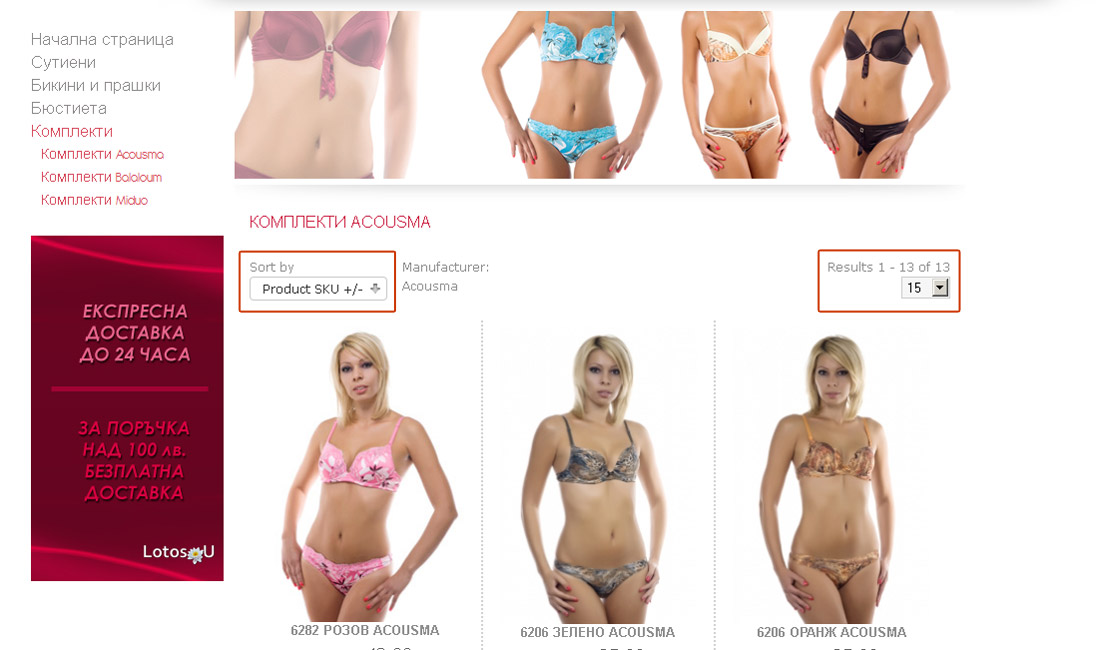
Fields "Sort by" and "Results"
14 years 5 months ago - 14 years 5 months ago #12959
by dimarini
Fields "Sort by" and "Results" was created by dimarini
Hello,
Does somebody know how to remove the fields "Sort by" and "Results"?
Thank you and Best Regards!
Does somebody know how to remove the fields "Sort by" and "Results"?
Thank you and Best Regards!
Last edit: 14 years 5 months ago by dimarini.
Please Log in to join the conversation.
-
ivan.milic
Support Staff - Offline
- Moderator
-

Less
More
- Posts: 14116
- Thank you received: 1639
14 years 5 months ago #12966
by ivan.milic
Replied by ivan.milic on topic Re: Fields "Sort by" and "Results"
Try some other browse page template in category settings.
Please Log in to join the conversation.
14 years 5 months ago - 14 years 5 months ago #12976
by dimarini
Replied by dimarini on topic Re: Fields "Sort by" and "Results"
I have found the answer!
In order to remove the fields "Sort by" and "Results" download the default.php file situated in
templates/hot_cosmetics/html/com_virtuemart/category/
Open it and delete the following lines
140 <div class="orderby-displaynumber">
141 <div class="width70 floatleft">
142 <?php echo $this->orderByList; ?>
143 </div>
144 <div class="width30 floatright display-number"><?php echo $this->pagination->getResultsCounter();?><br/><?php echo $this->pagination->getLimitBox() ?></div>
145 <div class="clear"></div>
146 </div>
Save the file and upload it in
templates/hot_cosmetics/html/com_virtuemart/category/
Have a nice day!!!
In order to remove the fields "Sort by" and "Results" download the default.php file situated in
templates/hot_cosmetics/html/com_virtuemart/category/
Open it and delete the following lines
140 <div class="orderby-displaynumber">
141 <div class="width70 floatleft">
142 <?php echo $this->orderByList; ?>
143 </div>
144 <div class="width30 floatright display-number"><?php echo $this->pagination->getResultsCounter();?><br/><?php echo $this->pagination->getLimitBox() ?></div>
145 <div class="clear"></div>
146 </div>
Save the file and upload it in
templates/hot_cosmetics/html/com_virtuemart/category/
Have a nice day!!!
Last edit: 14 years 5 months ago by dimarini.
Please Log in to join the conversation.
Time to create page: 0.155 seconds