

- Posts: 1
- Thank you received: 0
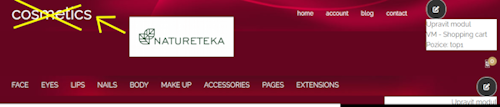
Instead of the title Cosmetics on the home page, insert your own logo in png.
3 months 2 weeks ago #52173
by eduard9
Instead of the title Cosmetics on the home page, insert your own logo in png. was created by eduard9
Please help me, how can I insert my own logo in png instead of the word Cosmetic on the home page.
Thank you very much for your help.
Thank you very much for your help.
Please Log in to join the conversation.


3 months 2 weeks ago #52174
by milos
Replied by milos on topic Instead of the title Cosmetics on the home page, insert your own logo in png.
Hello,
1. Using FTP or Media Manager, upload your logo to the folder /media/templates/site/cosmetics/images
2. Go to System > Site Template Styles > Hot Cosmetics > Features > Branding.
3. If you uploaded the logo file properly, it will appear in the list in the Logo Image File parameter. Select it there and save template settings.
Regards,
Milos
1. Using FTP or Media Manager, upload your logo to the folder /media/templates/site/cosmetics/images
2. Go to System > Site Template Styles > Hot Cosmetics > Features > Branding.
3. If you uploaded the logo file properly, it will appear in the list in the Logo Image File parameter. Select it there and save template settings.
Regards,
Milos
Please Log in to join the conversation.
Time to create page: 0.182 seconds