
- Thank you received: 0
Inserting logo.swf
-
indira
- Topic Author
- New Member
-

Less
More
12 years 5 months ago #35918
by indira
Replied by indira on topic Inserting logo.swf
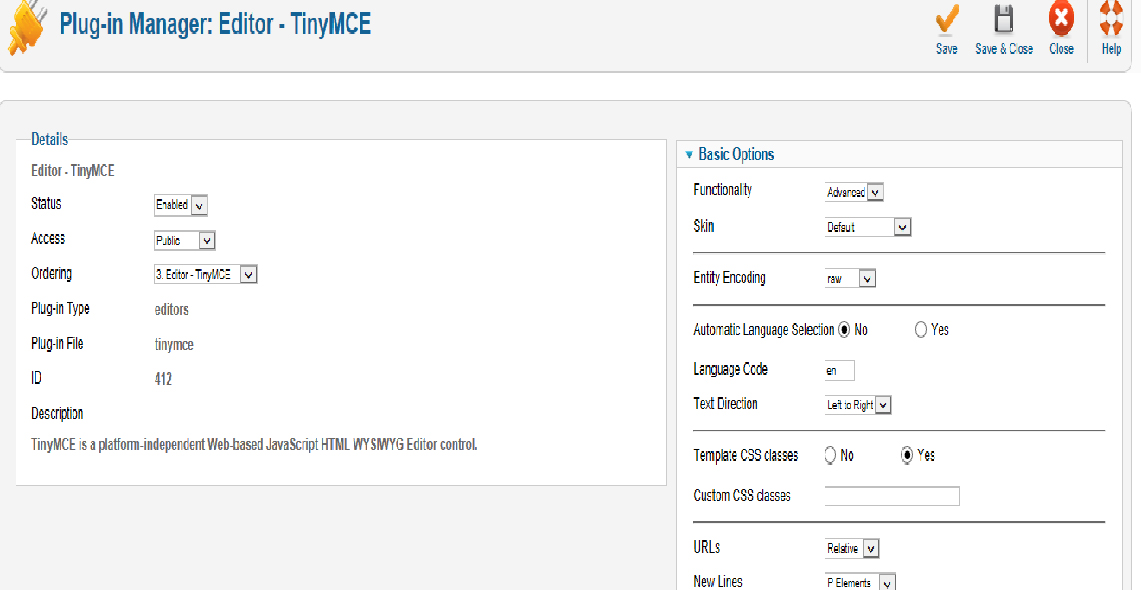
Sir, as per your request, please find attached the screenshot
Please Log in to join the conversation.
-
ivan.milic
Support Staff - Offline
- Moderator
-

Less
More
- Posts: 14116
- Thank you received: 1639
12 years 5 months ago #35923
by ivan.milic
Replied by ivan.milic on topic Inserting logo.swf
Parameters you look:
Prohibited Elements
Extended Valid Elements
remove iframe from "Prohibited Elements"
add object to "Extended Valid Elements"
Prohibited Elements
Extended Valid Elements
remove iframe from "Prohibited Elements"
add object to "Extended Valid Elements"
Please Log in to join the conversation.
-
indira
- Topic Author
- New Member
-
Less
More
- Thank you received: 0
12 years 5 months ago #36067
by indira
Replied by indira on topic Inserting logo.swf
Sir
Finally, I have been able to insert logo.swf by following all the steps you mentioned. In the following codes derived by Amara Software, I had to change only the path of the image by inserting "images/" in the following -
<embed src="images/finallogopvesA.swf" menu="false" quality="high" wmode="transparent"
Also, I had to upload the swf file in the same path.
Codes derived by Amara Software -
<object classid="clsid:D27CDB6E-AE6D-11cf-96B8-444553540000"
codebase="download.macromedia.com/pub/shockwave/ca....cab#version=6,0,0,0"
width="942" height="200">
<param name="movie" value="finallogopvesA.swf">
<param name="menu" value="false">
<param name="quality" value="high">
<param name="wmode" value="transparent">
<param name="scale" value="noscale">
<embed src="finallogopvesA.swf" menu="false" quality="high" wmode="transparent"
scale="noscale" width=942 height=200 type="application/x-shockwave-flash"
pluginspace=" www.macromedia.com/shockwave/download/in...rsion=ShockwaveFlash ">
</embed>
</object>
If, Adobe Flash is not updated, the logo flash will not come.
Thanks again for your continuous help.
Finally, I have been able to insert logo.swf by following all the steps you mentioned. In the following codes derived by Amara Software, I had to change only the path of the image by inserting "images/" in the following -
<embed src="images/finallogopvesA.swf" menu="false" quality="high" wmode="transparent"
Also, I had to upload the swf file in the same path.
Codes derived by Amara Software -
<object classid="clsid:D27CDB6E-AE6D-11cf-96B8-444553540000"
codebase="download.macromedia.com/pub/shockwave/ca....cab#version=6,0,0,0"
width="942" height="200">
<param name="movie" value="finallogopvesA.swf">
<param name="menu" value="false">
<param name="quality" value="high">
<param name="wmode" value="transparent">
<param name="scale" value="noscale">
<embed src="finallogopvesA.swf" menu="false" quality="high" wmode="transparent"
scale="noscale" width=942 height=200 type="application/x-shockwave-flash"
pluginspace=" www.macromedia.com/shockwave/download/in...rsion=ShockwaveFlash ">
</embed>
</object>
If, Adobe Flash is not updated, the logo flash will not come.
Thanks again for your continuous help.
Please Log in to join the conversation.
Time to create page: 0.080 seconds