

- Posts: 8
- Thank you received: 0
#table How can add a table in the content area?
2 years 7 months ago #50869
by dani4
#table How can add a table in the content area? was created by dani4
How can add a table in the content area?
Please Log in to join the conversation.


2 years 7 months ago #50872
by milos
Replied by milos on topic #table How can add a table in the content area?
Hello,
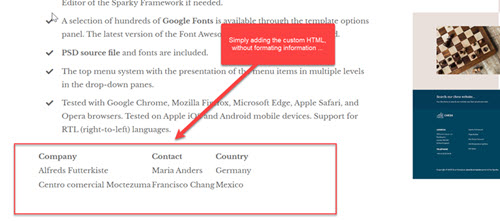
If you are using the Sparky Page Builder, it does not support HTML tables at this moment. However, you can insert a Custom HTML block and insert your table as HTML. This is a sample table with 3 rows and 3 columns:
Also, you can switch to another Joomla editor (such as JCE) and edit the page that contains the table with this editor.
Regards,
Milos
If you are using the Sparky Page Builder, it does not support HTML tables at this moment. However, you can insert a Custom HTML block and insert your table as HTML. This is a sample table with 3 rows and 3 columns:
Code:
<table>
<tr>
<th>Company</th>
<th>Contact</th>
<th>Country</th>
</tr>
<tr>
<td>Alfreds Futterkiste</td>
<td>Maria Anders</td>
<td>Germany</td>
</tr>
<tr>
<td>Centro comercial Moctezuma</td>
<td>Francisco Chang</td>
<td>Mexico</td>
</tr>
</table>
Also, you can switch to another Joomla editor (such as JCE) and edit the page that contains the table with this editor.
Regards,
Milos
Please Log in to join the conversation.
2 years 7 months ago - 2 years 7 months ago #50875
by dani4
Replied by dani4 on topic #table How can add a table in the content area?
Thank you for your response.
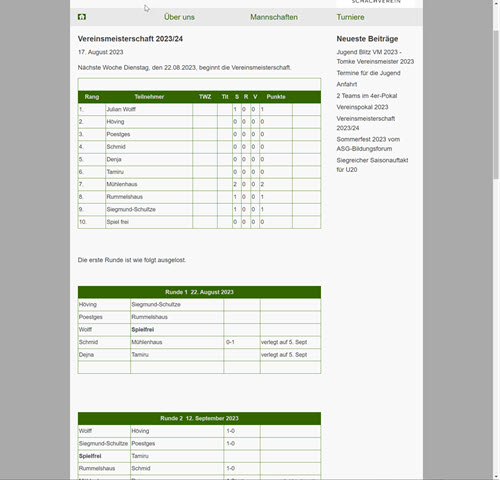
As a chess club, the table object is very important for us. Adding the custom HTML works fine. Do you have an example with the corresponding CSS in the look & feel of the theme provided?
Maybe that could help.
As a chess club, the table object is very important for us. Adding the custom HTML works fine. Do you have an example with the corresponding CSS in the look & feel of the theme provided?
Maybe that could help.
Last edit: 2 years 7 months ago by dani4. Reason: See the attached files ...
Please Log in to join the conversation.
2 years 7 months ago #50877
by milos
Replied by milos on topic #table How can add a table in the content area?
Hello,
Please edit the file /media/templates/site/chess/css/custom.css and somewhere at the top of this file, add this CSS code:
Regards,
Milos
Please edit the file /media/templates/site/chess/css/custom.css and somewhere at the top of this file, add this CSS code:
Code:
/* table */
table {
border: 1px solid #1C6EA4;
width: 100%;
text-align: left;
border-collapse: collapse;
}
table td, table th {
border: 1px solid #AAAAAA;
padding: 5px;
}
table tbody td {
font-size: 13px;
}
table th {
background: var(--sparkycolor4);
border: 1px solid var(--sparkycolor4);
color: #fff;
}
Regards,
Milos
The following user(s) said Thank You: dani4
Please Log in to join the conversation.
Time to create page: 0.199 seconds