

- Posts: 6
- Thank you received: 0
Different Appearence in IE / Chrome / Firefox
12 years 2 months ago #37757
by dabiotti
Replied by dabiotti on topic Different Appearence in IE / Chrome / Firefox
Same problem here, adding that code doesnt solve the problem 
help please
help please
Please Log in to join the conversation.
-
ivan.milic
Support Staff - Offline
- Moderator
-

Less
More
- Posts: 14116
- Thank you received: 1639
12 years 2 months ago #37760
by ivan.milic
Replied by ivan.milic on topic Different Appearence in IE / Chrome / Firefox
It does not mean problem is same if appears same. Send link so we could check
Please Log in to join the conversation.
12 years 2 months ago #37764
by dabiotti
Replied by dabiotti on topic Different Appearence in IE / Chrome / Firefox
Please Log in to join the conversation.
-
ivan.milic
Support Staff - Offline
- Moderator
-
Less
More
- Posts: 14116
- Thank you received: 1639
12 years 2 months ago #37772
by ivan.milic
Replied by ivan.milic on topic Different Appearence in IE / Chrome / Firefox
In layout designed for row containing carouse set some row class like carousel_row, then in template_css.css add:
.carousel_row{
margin-bottom:30px;
}
.carousel_row{
margin-bottom:30px;
}
The following user(s) said Thank You: dabiotti
Please Log in to join the conversation.
12 years 2 months ago #37774
by dabiotti
Replied by dabiotti on topic Different Appearence in IE / Chrome / Firefox
"In layout designed for row containing carouse set some row class like carousel_row"
Sorry, can you explain this to me step by step? im not sure how to do that.
thanks again, i appreaciate it.
Sorry, can you explain this to me step by step? im not sure how to do that.
thanks again, i appreaciate it.
Please Log in to join the conversation.
-
ivan.milic
Support Staff - Offline
- Moderator
-
Less
More
- Posts: 14116
- Thank you received: 1639
12 years 2 months ago #37775
by ivan.milic
Replied by ivan.milic on topic Different Appearence in IE / Chrome / Firefox
Go to template manager, enter template options, in layout designer in class field type carousel_row. See image in attachment for better understanding.
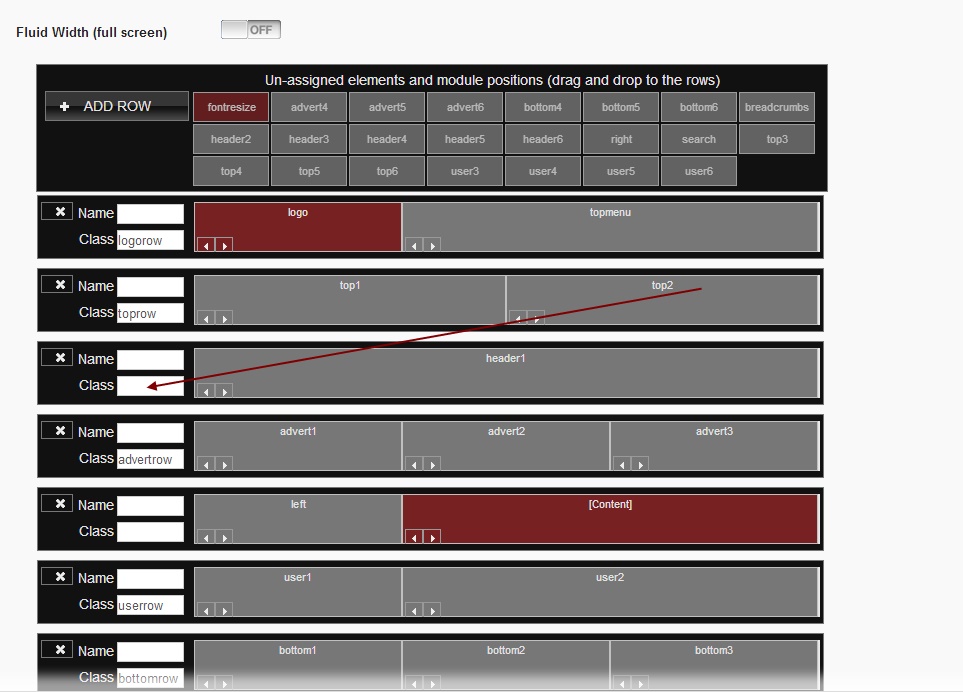
The following user(s) said Thank You: dabiotti
Please Log in to join the conversation.
Time to create page: 0.121 seconds