
- Posts: 29
- Thank you received: 0
Error updating
-
Martín G.F.
Active member - Topic Author
- Offline
- Member
-

Less
More
9 months 4 days ago - 9 months 4 days ago #51942
by Martín G.F.
Error updating was created by Martín G.F.
Hi Milos,
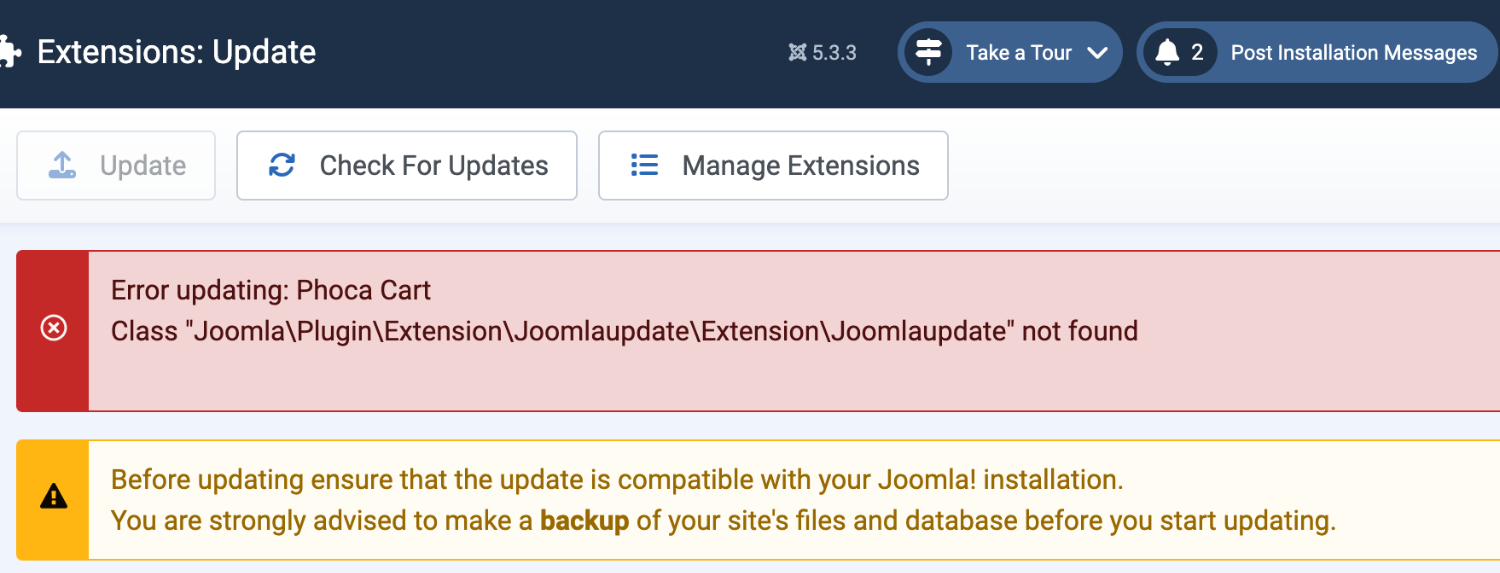
After performing a clean install of version 5, I updated Joomla, and when I tried to install the first of the 16 "Phoca Cart" updates, I got the error I'm sharing with you.
I haven't been able to install any of the Phoca xxx updates.
I tried browsing the Phoca product galleries, but they aren't working.
Please tell me the steps to follow to resolve this issue.
Phoca Cart Brands Module Class "Joomla\Plugin\Extension\Joomlaupdate\Extension\Joomlaupdate" not found
I just downloaded the updates to 5.1.x versions and the result is the same.
Thank you very much.
Best regards.
After performing a clean install of version 5, I updated Joomla, and when I tried to install the first of the 16 "Phoca Cart" updates, I got the error I'm sharing with you.
I haven't been able to install any of the Phoca xxx updates.
I tried browsing the Phoca product galleries, but they aren't working.
Please tell me the steps to follow to resolve this issue.
Phoca Cart Brands Module Class "Joomla\Plugin\Extension\Joomlaupdate\Extension\Joomlaupdate" not found
I just downloaded the updates to 5.1.x versions and the result is the same.
Thank you very much.
Best regards.

Last edit: 9 months 4 days ago by Martín G.F..
Please Log in to join the conversation.


9 months 4 days ago #51945
by milos
Replied by milos on topic Error updating
Hello,
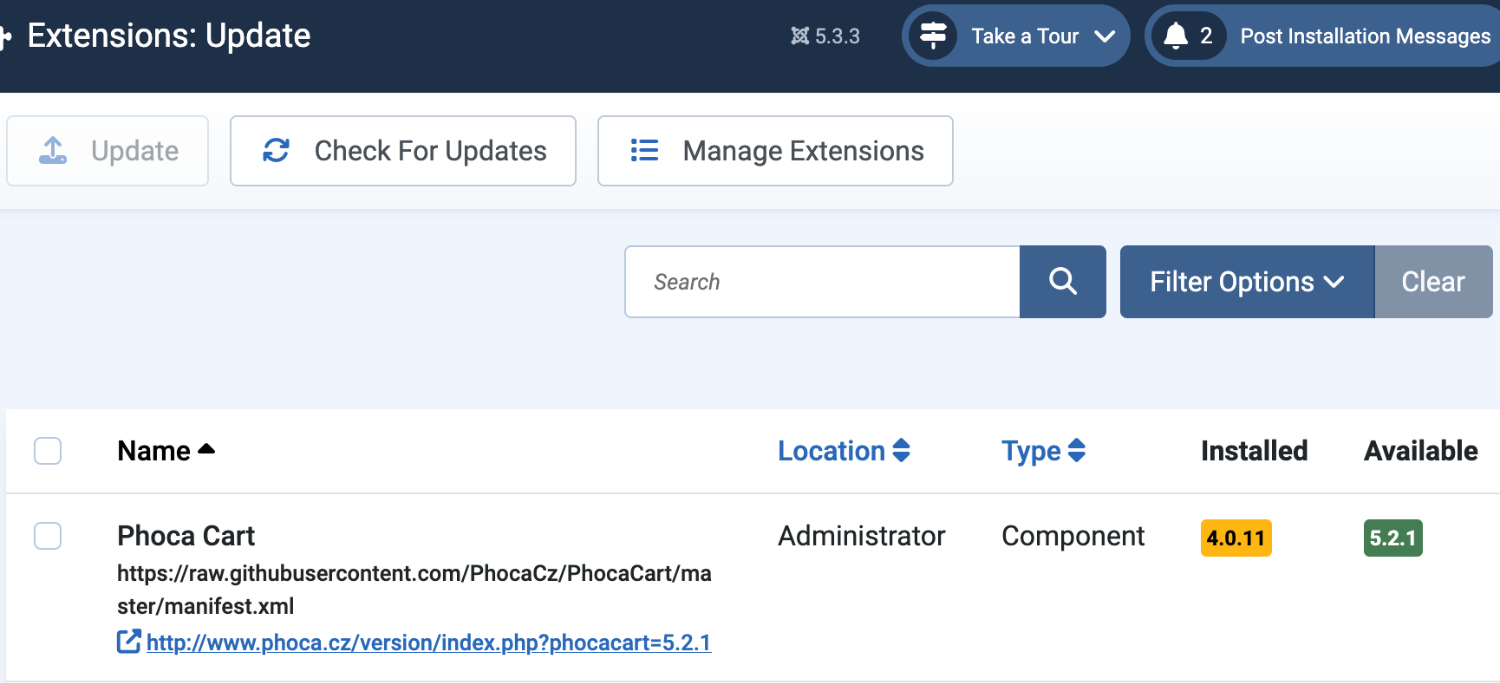
You should upgrade Joomla first to version 5.3.3. Then you should upgrade the Phoca Cart component to version 5.2.1. Finally, you can upgrade the modules to version 5.1.1.
FYI, we upgraded everything properly and uploaded the new HotStart installation, where everything is up-to-date out of the box. So, I recommend that you re-download the template's HotStart installation and re-install it on your hosting.
Regards,
Milos
You should upgrade Joomla first to version 5.3.3. Then you should upgrade the Phoca Cart component to version 5.2.1. Finally, you can upgrade the modules to version 5.1.1.
FYI, we upgraded everything properly and uploaded the new HotStart installation, where everything is up-to-date out of the box. So, I recommend that you re-download the template's HotStart installation and re-install it on your hosting.
Regards,
Milos
Please Log in to join the conversation.
-
Martín G.F.
Active member - Topic Author
- Offline
- Member
-
Less
More
- Posts: 29
- Thank you received: 0
9 months 4 days ago - 9 months 4 days ago #51946
by Martín G.F.
Replied by Martín G.F. on topic Error updating
Hi Milos,
When installing from scratch, the first error is that I can't install the additional languages from the beginning. I can only install languages after the initial installation is complete.
It also doesn't automatically delete the installation folder; I have to delete it by logging into the hosting.
I'm sharing two images showing the steps you told me to take and the results.
I'd like to let you know that I've already performed the same steps, with the same results.
I've been working with your templates for many years, and I always like the ability to install from scratch with the examples, which makes working with them much easier.
If possible, I'd love to be able to install from scratch and simply update without any subsequent errors.
I look forward to your comments.
Thank you very much.
Best regards.
When installing from scratch, the first error is that I can't install the additional languages from the beginning. I can only install languages after the initial installation is complete.
It also doesn't automatically delete the installation folder; I have to delete it by logging into the hosting.
I'm sharing two images showing the steps you told me to take and the results.
I'd like to let you know that I've already performed the same steps, with the same results.
I've been working with your templates for many years, and I always like the ability to install from scratch with the examples, which makes working with them much easier.
If possible, I'd love to be able to install from scratch and simply update without any subsequent errors.
I look forward to your comments.
Thank you very much.
Best regards.
Last edit: 9 months 4 days ago by Martín G.F..
Please Log in to join the conversation.
9 months 3 days ago #51947
by milos
Replied by milos on topic Error updating
Hello Martin,
Just re-download (download again) the HotStart file "hot_electronics5x_hotstart.zip" from our repository and install it from the start, following this www.hotjoomlatemplates.com/documentation
The Phoca Cart and everything will be upgraded because we upgraded the HotStart file.
You can install additional languages later. Please do not install it during the HotStart installation.
If you want us to install the template for you, the fee is $50, and we need the hosting control panel access of the domain where it should be installed. This doesn't include any customizations, just template installation with demo data.
Regards,
Milos
Just re-download (download again) the HotStart file "hot_electronics5x_hotstart.zip" from our repository and install it from the start, following this www.hotjoomlatemplates.com/documentation
The Phoca Cart and everything will be upgraded because we upgraded the HotStart file.
You can install additional languages later. Please do not install it during the HotStart installation.
If you want us to install the template for you, the fee is $50, and we need the hosting control panel access of the domain where it should be installed. This doesn't include any customizations, just template installation with demo data.
Regards,
Milos
The following user(s) said Thank You: Martín G.F.
Please Log in to join the conversation.
-
Martín G.F.
Active member - Topic Author
- Offline
- Member
-
Less
More
- Posts: 29
- Thank you received: 0
9 months 3 days ago #51948
by Martín G.F.
Replied by Martín G.F. on topic Error updating
Hi Milos,
Okay, I'll download and perform the new installation.
I'll get back to you with any updates.
Thank you very much.
Best regards.
Okay, I'll download and perform the new installation.
I'll get back to you with any updates.
Thank you very much.
Best regards.
Please Log in to join the conversation.
Time to create page: 0.226 seconds