
- Posts: 5
- Thank you received: 0
Problem with width on front-end
-
coworkinvest1
Active member - Topic Author
- Offline
- New Member
-

Less
More
6 months 2 weeks ago - 6 months 2 weeks ago #52071
by coworkinvest1
Problem with width on front-end was created by coworkinvest1
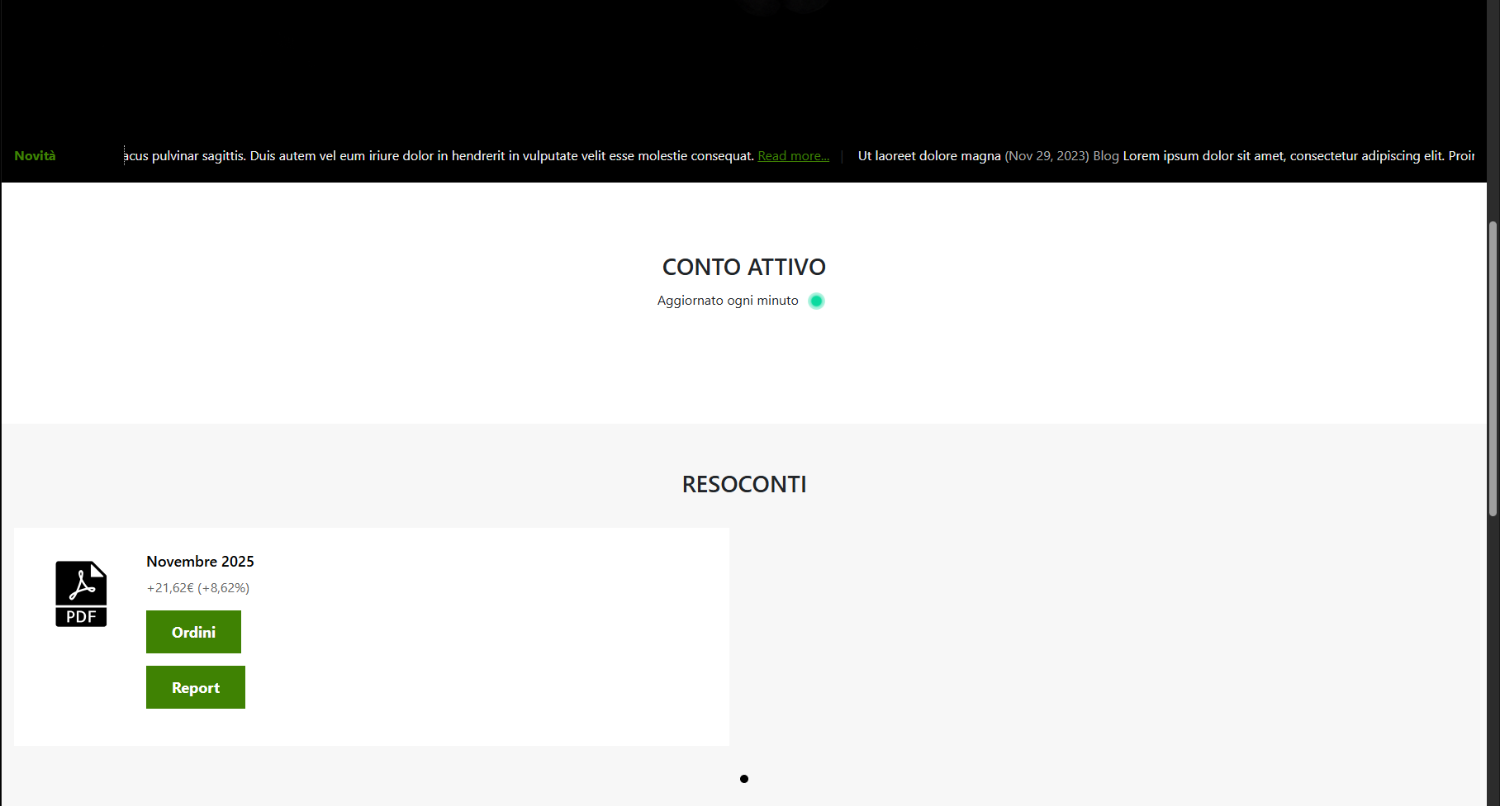
Hello, how has the width of the site content changed?
I have always worked with the width that is also shown on your demo then suddenly now the site you see everything at a full width.
How can I solve?
My website: coworkinvest.altervista.org
Thank you.
I have always worked with the width that is also shown on your demo then suddenly now the site you see everything at a full width.
How can I solve?
My website: coworkinvest.altervista.org
Thank you.

Last edit: 6 months 2 weeks ago by coworkinvest1.
Please Log in to join the conversation.


6 months 2 weeks ago #52073
by milos
Replied by milos on topic Problem with width on front-end
Hello,
Again, the template is not installed properly. Did you install the template with demo data, as per this guide www.hotjoomlatemplates.com/documentation , or did you want to install the template only?
I can see that there are missing CSS and JS files, and the frontend of your website is not working properly. Try re-installing the template or at least try re-installation of the template files only (install the file hot_fintech6x.zip through Joomla, then go to the template options and save it once).
Also, you can provide super user access so we can check this. You can post this on the forum privately if you select a part of the text and click the "lock" (confidential) icon.
Regards,
Milos
Again, the template is not installed properly. Did you install the template with demo data, as per this guide www.hotjoomlatemplates.com/documentation , or did you want to install the template only?
I can see that there are missing CSS and JS files, and the frontend of your website is not working properly. Try re-installing the template or at least try re-installation of the template files only (install the file hot_fintech6x.zip through Joomla, then go to the template options and save it once).
Also, you can provide super user access so we can check this. You can post this on the forum privately if you select a part of the text and click the "lock" (confidential) icon.
Regards,
Milos
Please Log in to join the conversation.
-
coworkinvest1
Active member - Topic Author
- Offline
- New Member
-
Less
More
- Posts: 5
- Thank you received: 0
6 months 2 weeks ago - 6 months 2 weeks ago #52074
by coworkinvest1
Replied by coworkinvest1 on topic Problem with width on front-end
Hi Milos, thank you for you reply.
I installed the whole demo site through the archive "hot_fintech6x_hotstart", loaded it completely and then suddenly changed. Now as per your suggestion.
I tried to reinstall only the templates and it worked, now it seems to see everything correctly.
But I realized now that every time I make a change to the style of the template and save, continuing to give me that error that I showed in the other thread, the template loses the width and returns everything com before.
Here my credential access:
coworkinvest.altervista.org/administrator
I installed the whole demo site through the archive "hot_fintech6x_hotstart", loaded it completely and then suddenly changed. Now as per your suggestion.
I tried to reinstall only the templates and it worked, now it seems to see everything correctly.
But I realized now that every time I make a change to the style of the template and save, continuing to give me that error that I showed in the other thread, the template loses the width and returns everything com before.
Here my credential access:
coworkinvest.altervista.org/administrator
This message contains confidential information
Last edit: 6 months 2 weeks ago by coworkinvest1.
Please Log in to join the conversation.
6 months 2 weeks ago #52077
by milos
Replied by milos on topic Problem with width on front-end
Hello,
The problem is related to your host. The free version of altervista.org is not a real host; it's just a virtual host, and therefore, the directories Joomla is using are incorrect. Therefore, you see the error that the file sparky_grid.php is not available, although it is available in the folder. When you assign your hosting account to a real domain name, I guess it will start working normally.
Regards,
Milos
The problem is related to your host. The free version of altervista.org is not a real host; it's just a virtual host, and therefore, the directories Joomla is using are incorrect. Therefore, you see the error that the file sparky_grid.php is not available, although it is available in the folder. When you assign your hosting account to a real domain name, I guess it will start working normally.
Regards,
Milos
Please Log in to join the conversation.
Time to create page: 0.188 seconds