

- Posts: 6
- Thank you received: 0
Set top menu to open automatically on startup
6 years 7 months ago #47654
by steveh
Set top menu to open automatically on startup was created by steveh
Hi folks,
The Tea template uses the responsive option on startup, even when on a PC. When you click on any of the menu item, menu opens.
My client wants to see that menu open on startup – not just when a menu item is clicked. Obviously I'd also reset the transparency to 100%.
So like the attached screencap, but immediate when arriving at the site:
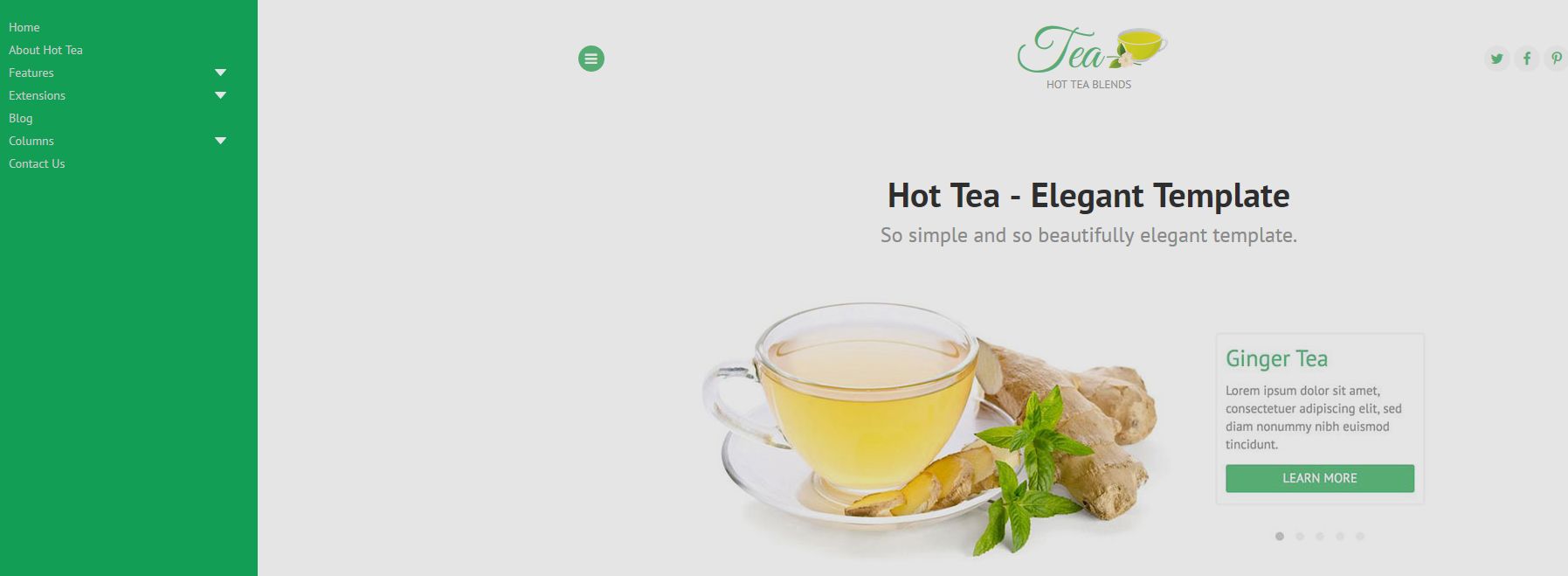
Is this doable using custom css or other magic you know?
Cheers,
Bruce Gordon
NZ Websites
The Tea template uses the responsive option on startup, even when on a PC. When you click on any of the menu item, menu opens.
My client wants to see that menu open on startup – not just when a menu item is clicked. Obviously I'd also reset the transparency to 100%.
So like the attached screencap, but immediate when arriving at the site:
Is this doable using custom css or other magic you know?
Cheers,
Bruce Gordon
NZ Websites
Please Log in to join the conversation.


6 years 7 months ago #47655
by milos
Replied by milos on topic Set top menu to open automatically on startup
Hello,
This template uses Offcanvas menu by default. You can change this to drop-down menu in the template parameters, under Menus tab.
Best regards,
Milos
This template uses Offcanvas menu by default. You can change this to drop-down menu in the template parameters, under Menus tab.
Best regards,
Milos
Please Log in to join the conversation.
Time to create page: 0.180 seconds