
- Posts: 2
- Thank you received: 0
Problem with Top Menu
-
apostgiannis@gmail.com
Inactive member - Topic Author
- Offline
- New Member
-

Less
More
15 years 8 months ago #2485
by apostgiannis@gmail.com
Problem with Top Menu was created by apostgiannis@gmail.com
Hello,
I have purchased the Hot Restaurant template and i installed it on my existing site. (not with hotstart).
I have an issue though! The top menu makes something weird, when i resize my browser window to a size less than 1000px width it places the last menu item under the first menu item and if i keep resizing the window it places other items under the first item and at the end i have a vertical menu instead of a horizontal. I saw at your demo server and this is not happening there.
Look my site here www.littlefox.gr/
I have followed the appropriate steps to make the menu work (like the id set to nav and the list option in joomla backend)
I don't know where is the problem.
Thanks a lot...and i wait for a helpful answer or solution to this!
I have purchased the Hot Restaurant template and i installed it on my existing site. (not with hotstart).
I have an issue though! The top menu makes something weird, when i resize my browser window to a size less than 1000px width it places the last menu item under the first menu item and if i keep resizing the window it places other items under the first item and at the end i have a vertical menu instead of a horizontal. I saw at your demo server and this is not happening there.
Look my site here www.littlefox.gr/
I have followed the appropriate steps to make the menu work (like the id set to nav and the list option in joomla backend)
I don't know where is the problem.
Thanks a lot...and i wait for a helpful answer or solution to this!
Please Log in to join the conversation.

15 years 8 months ago #2487
by milos
Replied by milos on topic Re: Problem with Top Menu
Looks fine to me, I checked the same situation is on template demo. If browser window is too thin, it's logical that the last menu item must go to the next row. Other solution is to hide it. To do this, add
in the layout.css file.
Code:
#topmenu { overflow:hidden; }
Please Log in to join the conversation.
-
apostgiannis@gmail.com
Inactive member - Topic Author
- Offline
- New Member
-
Less
More
- Posts: 2
- Thank you received: 0
15 years 8 months ago #2549
by apostgiannis@gmail.com
Replied by apostgiannis@gmail.com on topic Re: Problem with Top Menu
Hello milos.
I have added the code you told me in the layout.css but nothing happened. Still my menu does the same.
Any other command i can use??
Why i can't see the same thing in the demo server template?(you said that you saw it)
Thanks
I have added the code you told me in the layout.css but nothing happened. Still my menu does the same.
Any other command i can use??
Why i can't see the same thing in the demo server template?(you said that you saw it)
Thanks
Please Log in to join the conversation.
15 years 8 months ago #2552
by milos
Replied by milos on topic Re: Problem with Top Menu
Please try to enlarge overall template width in template parameters. Will it work then? Alternatively, please try to reduce top menu items names.
Please Log in to join the conversation.
15 years 1 week ago - 15 years 1 week ago #8089
by David2376
Why would you say this is logical??? It looks absolutely RIDICULOUS! The menu should extend the full width of the template (1000px) regardless of window size. See attached screenshot of your demo site. Please tell me how to fix this. None of your other templates seem to have this issue. Adding:
to layout.css does nothing!
Replied by David2376 on topic Re: Problem with Top Menu
milos wrote: Looks fine to me, I checked the same situation is on template demo. If browser window is too thin, it's logical that the last menu item must go to the next row. Other solution is to hide it. To do this, add
in the layout.css file.Code:#topmenu { overflow:hidden; }
Why would you say this is logical??? It looks absolutely RIDICULOUS! The menu should extend the full width of the template (1000px) regardless of window size. See attached screenshot of your demo site. Please tell me how to fix this. None of your other templates seem to have this issue. Adding:
Code:
#topmenu { overflow:hidden; }
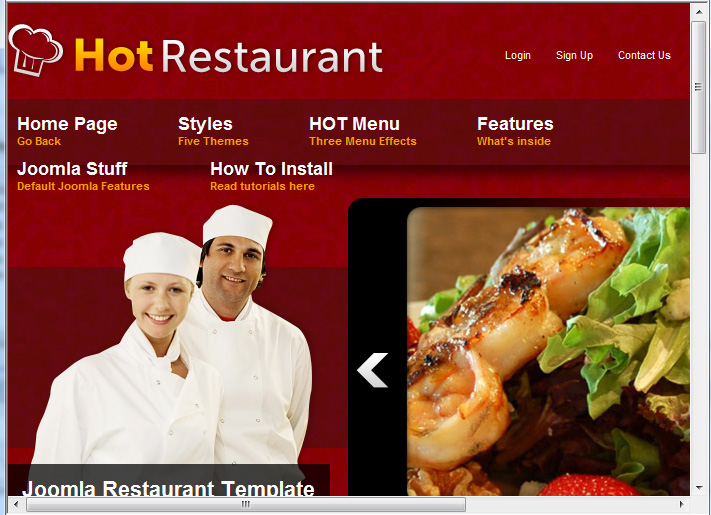
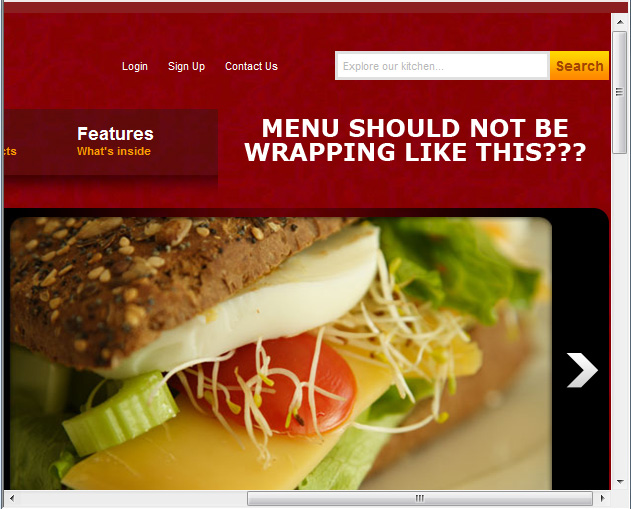
Last edit: 15 years 1 week ago by David2376.
Please Log in to join the conversation.
-
ivan.milic
Support Staff - Offline
- Moderator
-

Less
More
- Posts: 14116
- Thank you received: 1639
15 years 1 week ago #8091
by ivan.milic
Replied by ivan.milic on topic Re: Problem with Top Menu
Hi,
add this to template_css.css at the bottom:
#nav{
width: 1000px;
}
add this to template_css.css at the bottom:
#nav{
width: 1000px;
}
Please Log in to join the conversation.
Time to create page: 0.219 seconds