
What you can do with the Redirection component that is a part of Joomla core? Basically, you can redirect users from the old expired URL to the new active URL without messing with server configuration.
Why to create a redirection?
The Redirect component and its accompanying plugins are part of Joomla core for a reason. Almost every webmaster, after a period of time, comes up with the need to redirect visitors from an old URL to a new URL. Imagine this situation. You created a blog post and named it with a title that you thought was proper. After a year or two, you found out that your blog post would be more successful if you changed its URL to match the topic better. You can change the URL easily, but what if the blog post is linked from other websites already? As soon as you change the URL, visitors who click the link on the other website will land on a 404 page (page not found). This is not what you want. You must redirect them from the old URL to the new URL somehow. Also, you should tell search engines about it to keep the blog post's rankings.
This is done with 301 redirections. So, when a visitor (or search engine bot) comes to the old URL, your site tells him: "This URL is permanently moved to the new location". The visitor will be automatically redirected to the new URL, while the search engine bot will be encouraged to update the search engine's database. Therefore, the redirections are very useful for all webmasters. Sooner or later.
Redirections can be made on server-level
The redirections can be made at the server level. To be able to do this, you will need some experience with server administration. If you are on an Apache server, you can do this by adding a redirection command to the .htaccess file. If you are on NGINX, you can add the redirection command to the server configuration file. Each URL is one redirection command. If you have 100 redirections, you should write 100 redirection commands.
Why and how to use core Redirect component?
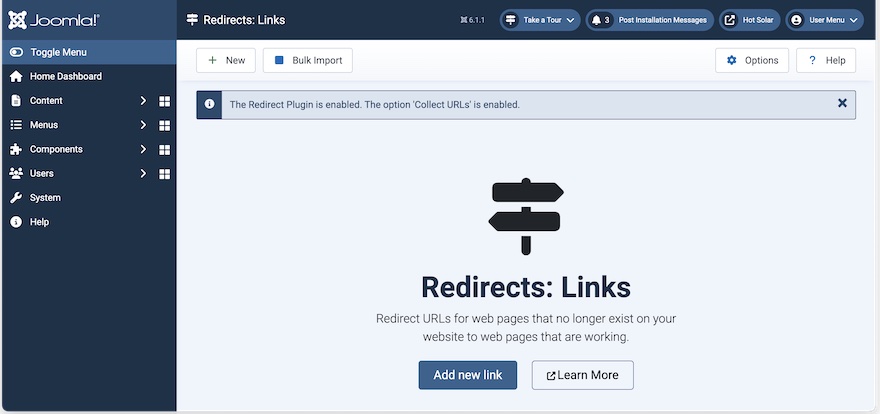
Using the Redirect component within Joomla is more convenient. First, you have all the redirection links as items in Joomla. You can review them or disable them when it's needed without writing a single line of code. Second, this component can discover which pages on your website that don't exist visitors are trying to access. Very useful, because this gives you a signal to create a redirection and prevent further loss of visitors.
So, there are two things: Redirecting wrong URLs and discovering new wrong URLs. Therefore, there are two things in the Redirection component that make both redirecting and discovering possible.
Make sure the Redirect plugin is enabled
The Redirect component comes with its accompanying plugin that must be enabled if you want the redirections to work. When this plugin is disabled, the Redirect component does not influence your website frontend, although you can see the Redirect component in the Joomla backend and can add redirections.
So, go to System > Plugins and make sure that the system plugin "System - Redirect" is enabled. If it is enabled, the redirections you created will work, so let's make them.
How to create a redirection?
From your Joomla Dashboard, go to System > Redirects. If you see the notification that the Redirect plugin is not enabled, enable it first.
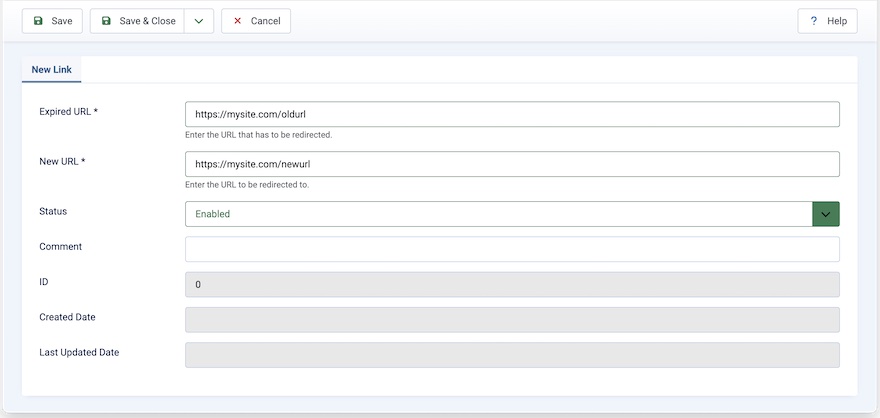
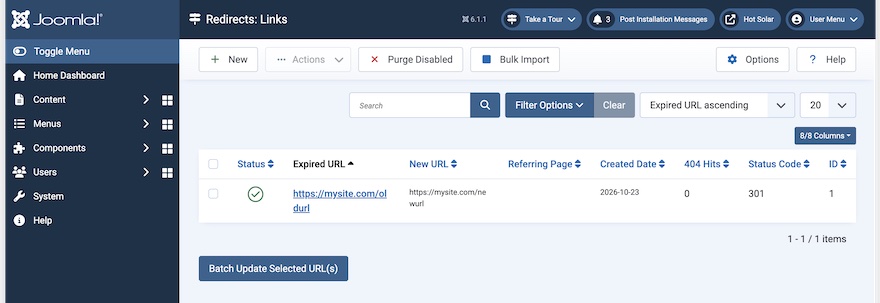
Click on the "Add new link" button to add your first redirection. In the "Expired URL" field, add the full URL of your old link that you want to redirect. In the New URL field, add the full URL of your new link where you'd like to redirect the old link. The Status option should be Enabled. Otherwise, this redirection will be disregarded. Optionally, you can add a comment about this redirection. When you save this redirection, it will appear on the list of redirections. You can test it on your site's frontend to confirm if it works.
What "Collect URLs" option does?
The "Collect URLs" option can be enabled or disabled in the "System - Redirect" plugin parameters. It's a very useful feature, but it has a downside. It's useful because it discovers bad URLs that your visitors are trying to access. This gives you signals that you should create some redirections. The downside is that it can overflow your website and database with discovered redirections that usually come from bots (search engine bots or AI bots) that are accessing your website, not from humans. And there could be thousands of them.
New, automatically discovered redirects will appear on the list of redirects over time. However, they won't be published. So, you should check each discovered redirect and decide whether to purge it or enable it. If you decide to enable it, you should also add a target URL for this discovered redirect.
Clicking the "Purge Disabled" button will purge all discovered URLs that you didn't enable.
Should the "Collect URLs" option be enabled in the Redirect component?
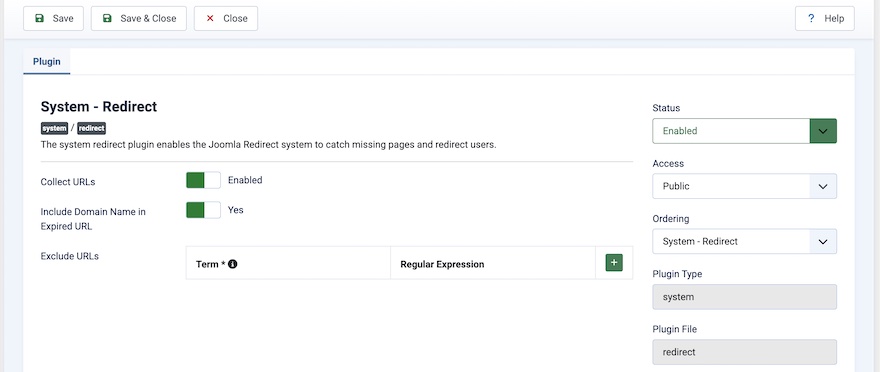
The "Collect URLs" option can be enabled or disabled in the System - Redirect plugin parameters.
So, to answer the question of whether "Collect URLs" should be enabled or disabled, I would say enable it with care. When this option is enabled, make sure you are checking the Redirect component daily and purge bad discovered redirections that come from bots. When you don't have time to deal with redirects, it's better to disable the discovery of redirects and prevent overflowing the database with data.
Advanced Mode
If you go to the options of the Redirect component, you can enable the advanced mode. As we said, all redirections created give status code 301. This means it is a permanent redirection. If you enable the advanced mode, you can select the status code yourself for each redirect. For example, you can select status code 302, which tells visitors and bots that the original link is redirected temporarily, not permanently.
Also, in the System - Redirect plugin parameters, you have an option to exclude discovery of URLs if the URLs meet some criteria. Why is this useful? Well, search engine bots and AI bots (and also spam bots and other malicious bots) will often try to "guess" the URLs on your website. So, you can often see the same discovered URLs even after you purge them. You can use this option of the plugin to add a term (with regular expression), and if that term is found in the discovered URLs, these URLs will be disregarded and won't be added to the list of discovered URLs.