


- Posts: 6979
- Thank you received: 746
change logo
14 years 3 months ago #14164
by milos
Replied by milos on topic Re: change logo
If you would like to change just text, then just change "chameleon" inside the HTML code, in example:
if you like to insert image instead of the code, then remove this HTML code and put this instead:
Don't forget to upload image into the /templates/hot_chameleon/images folder. Also, change logo.png with name of your logo image. Make sure the logo image is properly sized (not too big).
Code:
<div class="logo_line1"><a href="index.php">my company</a></div>
Code:
<img src="/templates/hot_chameleon/images/logo.png" />
Please Log in to join the conversation.
-
felipergueza
Inactive member - Offline
- Member
-

Less
More
- Posts: 134
- Thank you received: 0
14 years 3 months ago #14166
by felipergueza
Replied by felipergueza on topic Re: change logo
Now if I'm more clear this situation.
I will try to apply this solution that I provide.
greetings.
I will try to apply this solution that I provide.
greetings.
Please Log in to join the conversation.
-
felipergueza
Inactive member - Offline
- Member
-
Less
More
- Posts: 134
- Thank you received: 0
14 years 3 months ago - 14 years 3 months ago #14175
by felipergueza
Replied by felipergueza on topic Re: change logo
I went into the backend of my site and I have located the following path:
/ home / mysite / public_html / templates / hot_chameleon / index.php
Once there I copied all the code in a new document in notepad + +, finally I have searched some reference like the one mentioned:
<div class="logo_line1"> <a href="index.php"> my company </ a> </ div>
But the only thing I found is something like this:
<div class="header">
<div class="logo">
<div class="logo_pad">
<jdoc:include type="modules" name="logo" />
</ div>
It is in this line of code where I make the change!!
/ home / mysite / public_html / templates / hot_chameleon / index.php
Once there I copied all the code in a new document in notepad + +, finally I have searched some reference like the one mentioned:
<div class="logo_line1"> <a href="index.php"> my company </ a> </ div>
But the only thing I found is something like this:
<div class="header">
<div class="logo">
<div class="logo_pad">
<jdoc:include type="modules" name="logo" />
</ div>
It is in this line of code where I make the change!!
Last edit: 14 years 3 months ago by felipergueza.
Please Log in to join the conversation.
14 years 3 months ago #14177
by milos
Replied by milos on topic Re: change logo
<div class="logo_line1"> <a href="index.php"> my company </ a> </ div>
This HTML code is in Joomla backend, in Module Manager, module name Logo.
This HTML code is in Joomla backend, in Module Manager, module name Logo.
Please Log in to join the conversation.
-
felipergueza
Inactive member - Offline
- Member
-
Less
More
- Posts: 134
- Thank you received: 0
14 years 3 months ago - 14 years 3 months ago #14222
by felipergueza
Replied by felipergueza on topic Re: change logo
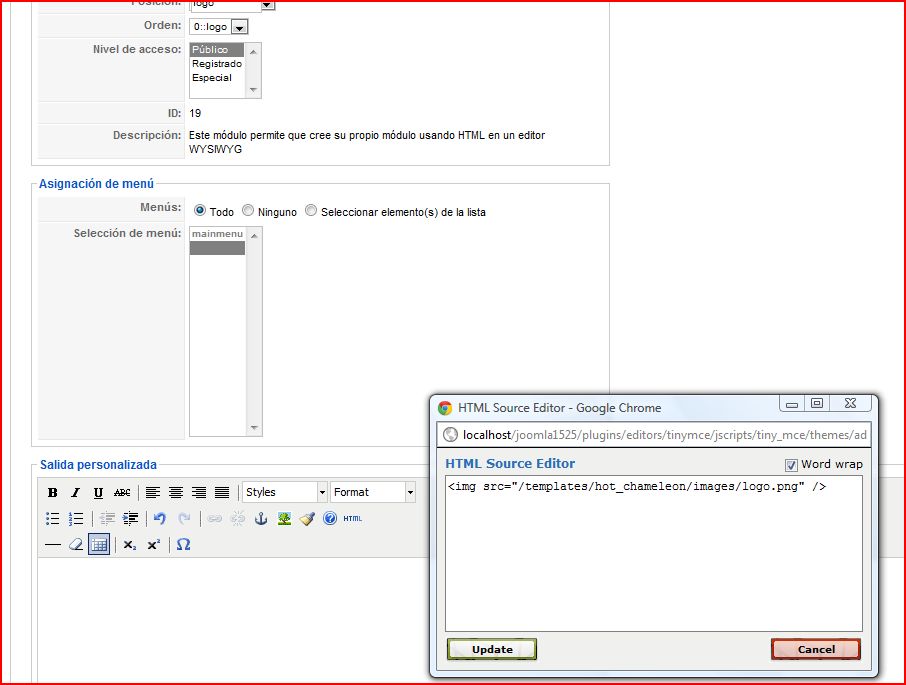
1 - I created a module from the area of joomla backend administrator and if I add the following code class="logo_line1"> <div href = "index.php"> my company </ a> </ div> the result is correct, see picture.
On the other hand:
2-In the following path: templates \ hot_chameleon \ images I've added a logo with the name of logo.png.
2.1_ The module created I inserted the following code <img src="/templates/hot_chameleon/images/logo.png" /> and the result is the following, see images that Annex.
Nearly achieving my goal, but so far can not view my logo.
help.
On the other hand:
2-In the following path: templates \ hot_chameleon \ images I've added a logo with the name of logo.png.
2.1_ The module created I inserted the following code <img src="/templates/hot_chameleon/images/logo.png" /> and the result is the following, see images that Annex.
Nearly achieving my goal, but so far can not view my logo.
help.


Last edit: 14 years 3 months ago by felipergueza.
Please Log in to join the conversation.
14 years 3 months ago - 14 years 3 months ago #14229
by milos
Replied by milos on topic Re: change logo
Change path to "templates/hot_chameleon/images/logo.png" (without / in the beginning).
If it does not work, use the full path of your site:
Make sure the image is really present on this link by entering this link in browser. The logo image should appear if the link is correct.
If it does not work, use the full path of your site:
Code:
http://www.yoursite.com/templates/hot_chameleon/images/logo.png
Make sure the image is really present on this link by entering this link in browser. The logo image should appear if the link is correct.
Last edit: 14 years 3 months ago by milos.
Please Log in to join the conversation.
Time to create page: 0.095 seconds