
This menu system allows you to show first, second and third menu levels at once and to show Joomla modules in drop-down panes.
Please make sure that your template supports Hot Mega Menu. This explained on the template features page of each template. If it supports it, then, most likely, with HotStart installation you will setup Hot Mega Menu as default menu system
Not all our templates support this menu system.
If you used standard template installation, you should activate this menu system yourself. Please edit the Top Menu module in User3 position and type "mega" in Menu Class Suffix field. Menu type should be set to "list". Menu Tag ID field must be empty.

This menu system allows you to:
- Show first, second and third menu levels at once.
- The first level is shown on template permanently, like tabs or buttons.
- The second level menu items are shown on the drop-down pane as headings (linkable) for the series of the third level menu items
- Show Joomla modules in drop-down panes. There are 10 module positions reserved for the mega menu: megamenu1, megamenu2... megamenu10. To activate them, you should:
- Create URL type menu item on Level 2 (it will serve as module heading) and enter a blank link, in example "javascript:;"
- Create Separator type menu item on Level 3 (select the URL item described above as its parent).
- The Separator menu item will be replaced with module position megamenu1.
- The next Separator menu item will be replaced with module position megamenu2, and so on...

The upper part of this graphic (34-39) shows typical scheme if you want to show 2nd and 3rd level menu items in drop-down menu.
You must not have level 4 (or deeper) menu items.
The bottom part of the graphic (40-43) shows how to include module positions in the mega menu. "Module in Menu" and "Polls" are both children of first-level menu item "Mega Menu". Their names are used to be module names. Each of them has one child menu item (type Separator) named as "Megamenu module" in our sample. They will be replaced with module positions megamenu1 and megamenu2.
To show module in menu, you must have Separator menu item in 3rd level and module published in appropriate module position (megamenu1, megamenu2...).
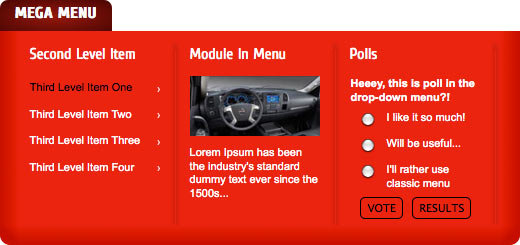
The next image shows what you get as result from Joomla menu structured as our example above. In this case "Module In Menu" and "Polls" modules are published in module positions "megamenu1" and "megamenu2".
Menu settings in Template Parameters
This is settings of Hot Mega Menu in the parameters of your template. This sample is from Hot Cars template. Your template might have different settings for the menu (if it supports Hot Mega Menu).
